Give your admins access to Privacy Center features by assigning a permission set license
and permission set to them. With this license, users can create retention and portability
policies, manage Right to Be Forgotten requests, and view run logs and Privacy Center schedules.
Privacy Center comes with 30 licenses.
Required Editions
| Available in: all editions |
| User Permissions Needed |
| To assign permission set license: |
Modify All Data and Privacy Center |
| To assign permission set: |
Modify All Data and Privacy Center |
- From Setup, in the Quick Find box, enter
Users, and then select Users.
- Click the user who you want to assign the permission set license to.
- In the Permission Set License Assignments related list, select Edit
Assignments.
- Enable Privacy Center User, and click
Save.
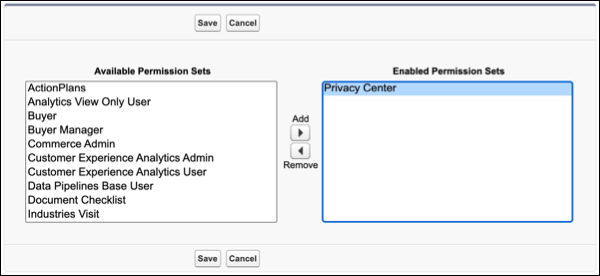
- Click the user who you want to assign the permission set to.
- In the Permission Set Assignments related list, select Edit
Assignments, then add Privacy Center. If the user isn’t an
admin, add Manage Data Subject Access Policies and Execute
Data Subject Access Policies.
- Save your changes.