
General Data Protection Regulation (GDPR) requires you to delete customers’ personal data when customers request it, or when it’s no longer necessary to keep. You can remove customers’ data from the Analytics for Loyalty app by deleting the records from a trending dataset.
Required Editions
| Available for an extra charge in Professional, Performance, and Unlimited editions that have Loyalty Management enabled. |
| User Permissions Needed | |
|---|---|
| To delete records from datasets | CRM Analytics Plus Admin and Loyalty Analytics Admin |

Note Before you delete records, make sure your app’s data is synced and it has the latest
data.
You can delete a contact or an account from the Analytics for Loyalty trending datasets.
- In CRM Analytics Studio, click and then select Data Manager.
- Select Dataflows & Recipes.
-
Under Dataflows, look for GDPR Trending and then click

- Select Edit.
- Select the filter node and edit the SAQL filter.
-
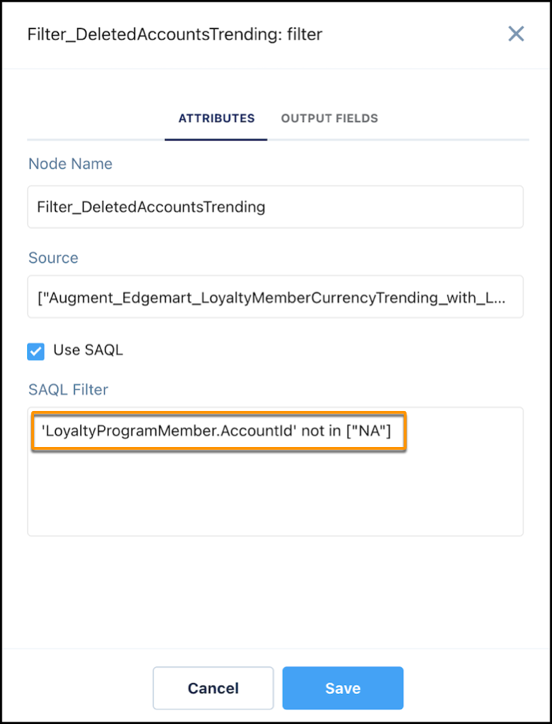
To delete an account,
- Select the Filter:DeletedAccountsTrending node.
-
In the SAQL filter string, replace NA with the ID of the account you want to delete.
- Save your changes.
-
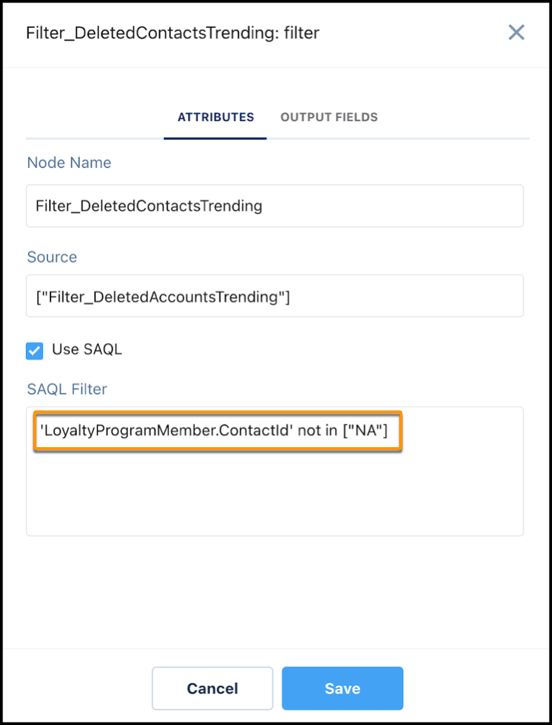
To delete a contact,
- Select the Filter:DeletedContactsTrending node.
-
In the SAQL filter string, replace NA with the ID of the contact you want to delete.
- Save your changes.
- Click Run Dataflow.
After the dataflow run completes, open the LoyaltyMemberCurrencyTrending datasets and verify if the records are deleted.