
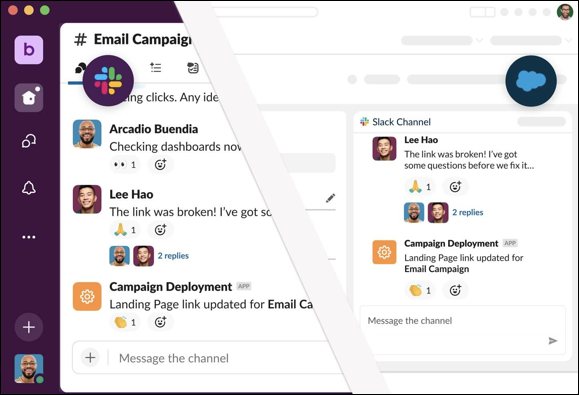
Salesforce channels bring the collaborative experience of Slack into Salesforce. Connect with your teams directly in a record, and collaborate in real time to solve problems and manage complex deals. You can access conversations in both Salesforce and Slack, and communicate with team members wherever they are.
Required Editions
| Available in: Lightning Experience |
| Available in: Essentials, Starter, Pro Suite, Professional, Enterprise, Unlimited, and Developer Editions |
Salesforce conversations sync instantly in corresponding Slack channels for reduced context switching across apps.
You can use Salesforce channels to:
- Connect teammates across Salesforce and Slack and collaborate in real time.
- Manage complex issues as a team with a dedicated place on a record to strategize around customers, review data, share documents, and coordinate processes.
- Streamline account handoffs and onboarding with all related conversations, files, and partners in one place.
- Set Up and Manage Salesforce Channels in Your Org
Configure Salesforce channels to help users collaborate on projects directly in a record and communicate with teammates in a unified channel across Salesforce and Slack. You can make Salesforce channels available on your record pages using the Slack panel or the Slack Lightning web component – no Marketplace app to install. - Manage the Slack Panel on Record Pages
The Slack panel offers a streamlined way to view and collaborate in Salesforce channels. You can open and close the panel with one click, so it takes up less room on a record page than the Slack component when you aren’t using Salesforce channels. - Manage the Slack Lightning Web Component on Record Pages
Follow these guidelines to use Salesforce channels on a record page via the Lightning web component. When a record page contains a Slack channel component, users in Salesforce can view or create a Slack channel for that record. - Communicate in a Salesforce Channel
After you join a Salesforce channel, you can start using it to communicate with your team. Any updates that you make in a Salesforce channel in Salesforce automatically appear in Slack as well. - Campaigns for Slack
Create space for team collaboration through dedicated campaign record channels in Slack. Each channel acts as a central workspace where members can post messages to plan campaign strategies and share ideas in real time. Channel notifications keep the members informed about important changes, so that they can work efficiently and stay connected.