
It's time for the first big reveal. Let's see how your Site looks and verify that it works.
-
Click the Site URL.

-
As expected, the Under Construction page loads. (It's the Visualforce page that
you specified as the Active Site Home Page when you created the Site.)

-
In your browser's address bar, add this text to the end of the Site's URL:
/GW_Volunteers__VolunteersSignupFS
(Note the two underscore characters between Volunteersand VolunteersSignupFS.) The full URL looks something like this (where mydomain is the custom domain that you registered):http://mydomain.force.com/GW_Volunteers__VolunteersSignupFS
If you specified a Default Web Address when you created your site, include the label in the URL, like so:
http://mydomain.force.com/yoursitelabel/GW_Volunteers__VolunteersSignupFS -
Hit Enter to load the page. Now we're in business! Check
out the Volunteers Signup page.
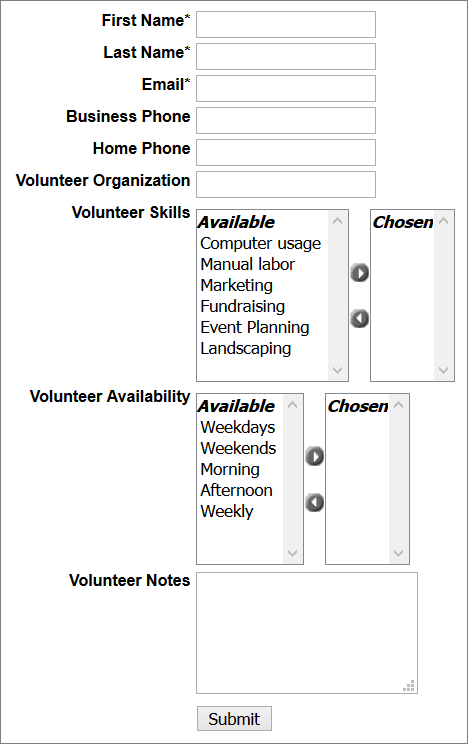
- Enter some test data in the form and submit it. Create a new volunteer and use your own email address so you can see how thank-you and notification emails look.
-
Back in Salesforce, find the newly created Contact. The Volunteer Status field
shows New Sign Up.
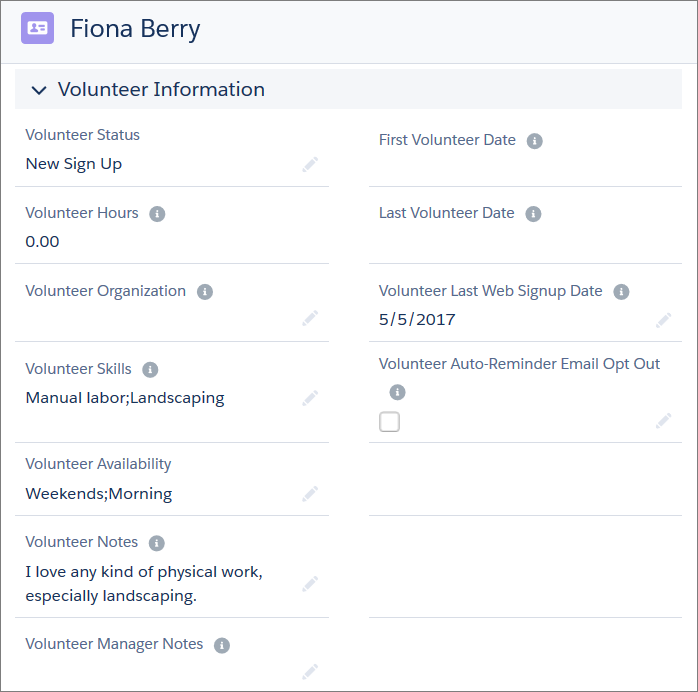
Curious how the other V4S pages look? Feel free to preview them now.
| To See This Page | Add This to the Site URL |
|---|---|
| Generic Volunteer Signup Page | /GW_Volunteers__VolunteersSignup or /GW_Volunteers__VolunteersSignupFS |
| Calendar Page | /GW_Volunteers__JobCalendar |
| Job Listings Page | /GW_Volunteers__VolunteersJobListing or /GW_Volunteers__VolunteersJobListingFS |
| Volunteer Report Hours Page | /GW_Volunteers__VolunteersReportHours |
| Personal Site Contact Lookup | /GW_Volunteers__PersonalSiteContactLookup |
| Personal Site Contact Info (For now, loading this page redirects you to the Personal Site Contact Lookup page, because we haven't done the required configuration for the Personal Site.) | /GW_Volunteers__PersonalSiteContactInfo |
Great work! Having a functional volunteer signup web form is a huge milestone. Next, customize and format the signup form so that it looks and feels consistent with the rest of your website. When you know the general customization principles for the signup page, it's easy to apply them to other pages.