
Understand how Pathways uses EDA Program Plan and Plan Requirement records.
To let support staff and students view Program Plans in Pathways, Student Success Hub uses two components: SSH Program Plan Highlights and SSH Program Plan Requirements Summary. These components require Program Plan and Plan Requirement records. Understanding how these EDA objects work with Pathways is critical.
- Understand the Structure of Program Plan and Plan Requirements
Let's go back to our student Stuart and look more closely at the requirements for an undergraduate degree in Economics. Here's how everything gets connected. - Plan Requirement Hierarchies and Nesting
A Program Plan typically includes many Plan Requirements, such as general ed, elective, lower division, upper division, optional, and required. To keep things organized, Plan Requirements can be grouped hierarchically, with some Plan Requirements nested under parent Plan Requirements. - Common Plan Requirement Combinations
Pathways is highly customizable. There are many combinations that you can make using different Plan Requirement options. - Program Plan Requirement Summary Component Features
Learn what information the Program Plan Requirement Summary component shows to your users. - Program Plan Requirements Summary Component Considerations
Before creating your Plan Requirements, keep these considerations in mind.
Understand the Structure of Program Plan and Plan Requirements
Let's go back to our student Stuart and look more closely at the requirements for an undergraduate degree in Economics. Here's how everything gets connected.
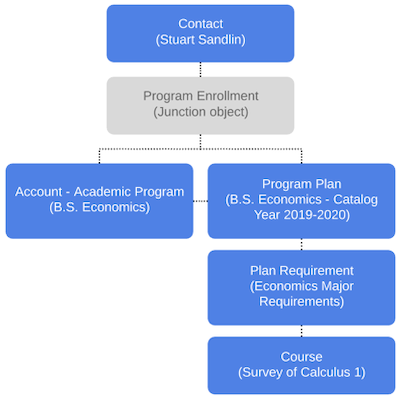
A Program Plan represents a specific offering for a degree or certification. To create a path for students to follow, a Program Plan uses Plan Requirements which can link to Courses. When a Program Enrollment is created for a student, the primary Program Plan associated with that Program is automatically linked to the Program Enrollment.
Plan Requirement Hierarchies and Nesting
A Program Plan typically includes many Plan Requirements, such as general ed, elective, lower division, upper division, optional, and required. To keep things organized, Plan Requirements can be grouped hierarchically, with some Plan Requirements nested under parent Plan Requirements.
For example, maybe you want to group your Economics Major Requirements into three subgroups—Required Lower Level Coursework, Required Upper Level Coursework, and Required Upper Level Math.
In Pathways, every discrete requirement—regardless of where it sits in the hierarchy—is represented by a Plan Requirement record. Let's take a look at our Economics Major Requirements example more closely.
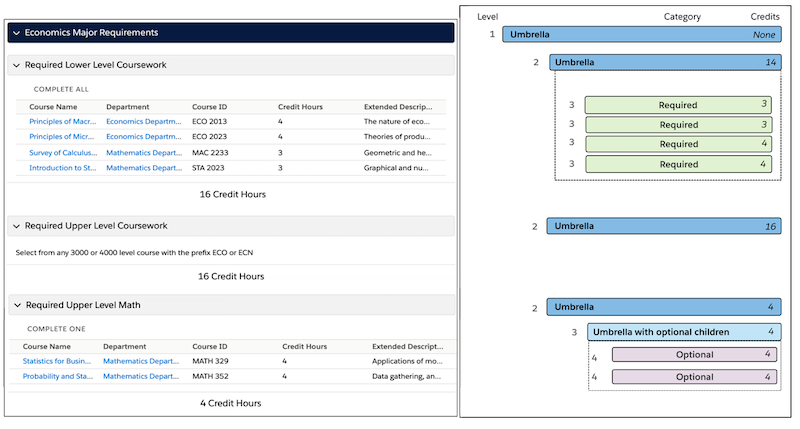
You can also think about these Plan Requirements by using a handy spreadsheet. Notice the values in the Plan Requirement Option column. They indicate the purpose of a particular Plan Requirement: umbrella, umbrella with optional children, required, and optional. We'll talk about those next.
|
Level |
Plan Requirements |
Plan Requirement Option |
|---|---|---|
|
1 |
Economics Major Requirements |
Umbrella |
|
2 |
Required Lower Level Coursework |
Umbrella |
|
3 |
Survey of Calculus 1 |
Required |
|
3 |
Introduction to Statistics |
Required |
|
3 |
Principles of Macroeconomics |
Required |
|
3 |
Principles of Microeconomics |
Required |
|
2 |
Required Upper Level Coursework Select from any 3000 or 4000 level course... |
Umbrella |
|
2 |
Required Upper Level Math |
Umbrella |
|
3 |
Required Upper Level Math (UOC) |
Umbrella with optional children |
|
4 |
Statistics for Business and Economics |
Optional |
|
4 |
Probability and Statistics |
Optional |
In Pathways, there are four ways to think about Plan Requirements. There are no special record types for these options. The distinction between these Plan Requirement options is determined by the Category field, whether or not it has child Plan Requirements, and if it has a linked Course.
|
Plan Requirement Option |
Description |
Children |
Category Field |
Credits Specified |
Has a Linked Course? |
Valid in Which Levels? |
|---|---|---|---|---|---|---|
|
Umbrella |
A type of Plan Requirement that you can use to either create groupings of requirements, at varying levels and composed of different types of requirements; or represent a standalone requirement with an open-ended structure, such as electives that can be fulfilled in many different ways. |
Allowed - but not mandatory |
Null |
Allowed - but not mandatory |
No |
1 and 2 |
|
Umbrella with optional children |
A type of Plan Requirement that parents a single level of children. Use it to create a grouping of Plan Requirements, all of which have their Category set to "Optional." It specifies the number of credits that fulfill the requirement, by selecting from among the options listed. This type of Plan Requirement doesn't display in the Pathways component UI like other Plan Requirement options do. It helps create the heading "Complete One" or "Complete # Credits," but the Plan Requirement name itself doesn't display. We recommend you include UOC in the name of these Plan Requirements to help you identify them more easily. |
Yes - limited to exactly one level of children |
Null - with all children set to Optional |
Yes |
No |
2 and 3 |
|
Required |
A Plan Requirement that must be fulfilled by completing its associated Course. It can be a standalone requirement high in the hierarchy or it can be parented by an umbrella Plan Requirement. |
No |
Required |
Yes |
Yes |
2 and 3 |
|
Optional |
A Plan Requirement that can be fulfilled by completing its associated Course. It only has other optional sibling Plan Requirements, and together they are all parented by an umbrella Plan Requirement. |
No |
Optional |
Yes |
Yes |
3 and 4 |
Common Plan Requirement Combinations
Pathways is highly customizable. There are many combinations that you can make using different Plan Requirement options.
Supported Base Combinations

|
Level and Option |
|---|
|
1 - Umbrella 2 - Required |
|
1 - Umbrella 2 - Umbrella |
|
1 - Umbrella 2 - Umbrella 3 - Required |
|
1 - Umbrella 2 - Umbrella with optional children 3 - Optional |
|
*1 - Umbrella 2 - Umbrella 3 - Umbrella with optional children 4 - Optional |
* This combination allows four levels because the fourth level is an optional Plan Requirement. Only optional Plan Requirements can be used in level 4.
You can also combine supported combinations to create other combos. For example:
| Level and Option |
|---|
|
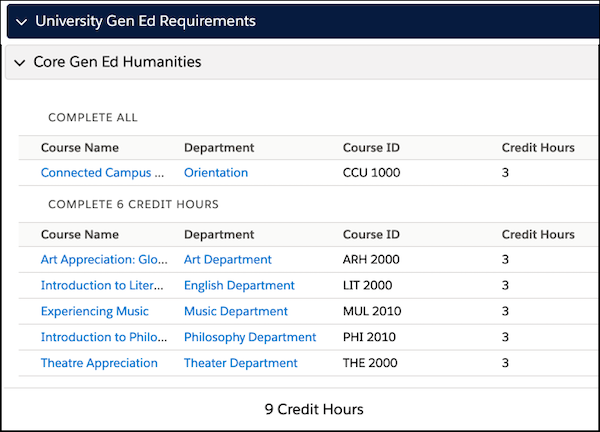
1 - Umbrella 2 - Umbrella 3 - Required 3 - Umbrella with optional children 4 - Optional |
Here's what this combination looks like.
Unsupported Base Combinations
These combinations will cause errors and may prevent the component from displaying.
|
Level and Option |
Limitation Notes |
|---|---|
|
1 - Required |
You can't have a required Plan Requirement in level 1. Required Plan Requirements must be nested under an umbrella Plan Requirement. |
|
1 - Umbrella with optional children 2 - Optional |
You can't have an umbrella with optional children in level 1. Optional Plan Requirements must be nested under two levels of umbrellas (where level 1 is an umbrella and level 2 is an umbrella with optional children). |
|
1 - Required 2 - Required/Optional |
Required and optional Plan Requirements can't have child Plan Requirements. |
|
1 - Umbrella 2 - Umbrella with optional children 3 - Optional 4 - Required/Optional |
|
|
1 - Umbrella 2 - Optional 2 - Required |
You can't mix optional and required Plan Requirements under an umbrella Plan Requirement. Create one umbrella Plan Requirement for optional children and one Plan Requirement for required Plan Requirements. |
|
1 - Umbrella 2 - Umbrella 3 - Umbrella |
You can't have three or more levels of standalone umbrella. |
|
1 - Umbrella 2 - Umbrella 3 - Umbrella 4 - Required |
You can't nest more than three levels. The only exception is for optional Plan Requirements. Try restructuring to only use three levels. |
Now that you understand nesting levels and combinations, you're probably thinking Pathways is a simple hierarchy of courses. But Pathways provides much more than that. Let's look at what else it can do.
Program Plan Requirement Summary Component Features
Learn what information the Program Plan Requirement Summary component shows to your users.
- Collapsible Sections
-
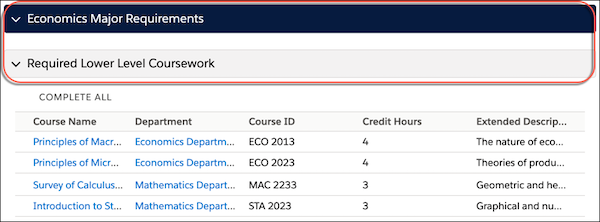
Level 1 and level 2 Plan Requirements that are umbrellas display as colored headers to help visually identify them. These levels are collapsible. When the component initially loads, sections are collapsed by default. You can't change the colors of these headers.
- Subheadings
-
Subheadings are provided for Plan Requirements that have children. These headings can be:
-
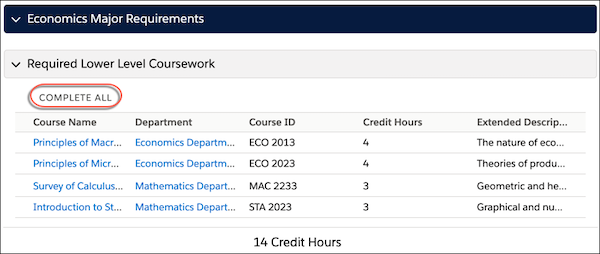
Complete All—this header displays when all the children in an umbrella Plan Requirement are required Plan Requirements.
-
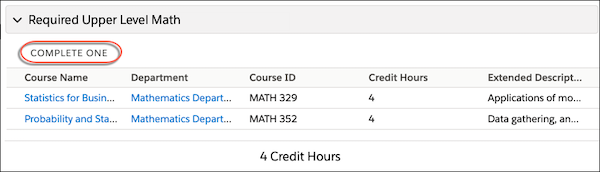
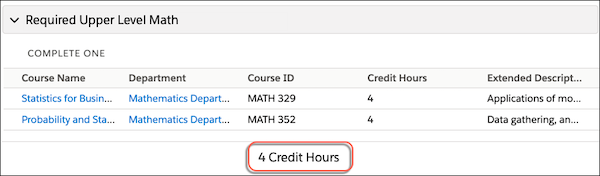
Complete One—this header displays when a Plan Requirement can be satisfied by one optional Plan Requirement. For example, a Plan Requirement (that's an umbrella with optional children) that specifies 8 Credit Hours, and has two nested optional Plan Requirements each worth 4 Credit Hours.
-
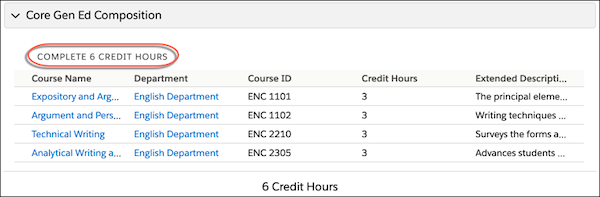
Complete # Credit Hours—this header displays when a Plan Requirement can be satisfied by some of its child Plan Requirements. For example, a Plan Requirement (that's an umbrella with optional children) that specifies 6 Credit Hours, and has nested Plan Requirements that total more than 6 Credit Hours.
-
- Total Credit Hours
-
Credit hours are displayed in Pathways for:
-
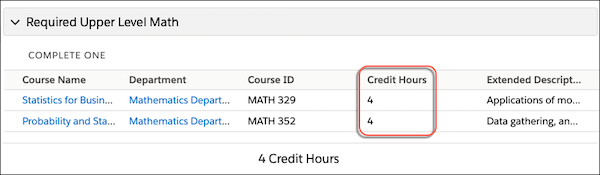
Plan Requirements (optional or required) with associated Courses that specify credits.
-
Umbrella Plan Requirements that specify credits.
-
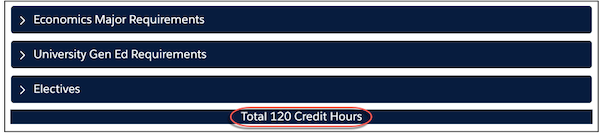
The Program Plan displays credits based on its Total Required Credits field.
-
- Sorting
-
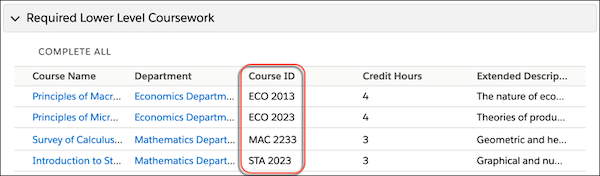
You can't control how umbrella Plan Requirements are sorted. However, groups of required Plan Requirements and optional Plan Requirements sort alphabetically by the Course ID.
Program Plan Requirements Summary Component Considerations
Before creating your Plan Requirements, keep these considerations in mind.
-
Each Program Plan must have an associated Account (Academic Program).
-
Umbrella Plan Requirements can specify a Program Plan or a Parent Plan Requirement, but not both.
-
For Level 1 Plan Requirements, specify an associated Program Plan and leave the Parent Plan Requirement field blank.
-
For Level 2 and 3 umbrella Plan Requirements, specify a Parent Plan Requirement field blank.
-
-
There's no limit to the number of required or optional Plan Requirements that you can nest under an umbrella Plan Requirement or an umbrella with optional children Plan Requirement.
-
EDA and Pathways support Credit Hours out of the box. If your institution uses a unit of measurement for courses other than Credit Hours, such as Units, you can override the labels using Translation Workbench. First, override the EDA labels on the coordinating objects and fields. Then override the Pathways custom labels. For more information, see Override Translations in Second-Generation Managed Packages and Unlocked Packages.
-
EDA automatically assigns Program Plans to Program Enrollments when a Program Plan associated with a Program is marked as the primary plan. This default behavior is controlled by a TDTM trigger. We don't recommend disabling this trigger. However, if you need to disable the trigger, edit the Trigger Handler record with the Class name
PREN_ProgramPlan_TDTand deselect the Active field.