
Understand the functions of the app, Setup, and the portal in Student Success Hub.
The Student Success Hub app is optimized to quickly find, reference, and edit multiple student records. Designed as a Lightning console app and often called a console, the Student Success Hub UI displays records as tabs and subtabs across the top of the page, offers a split view list on the left, and a utility bar at the bottom.
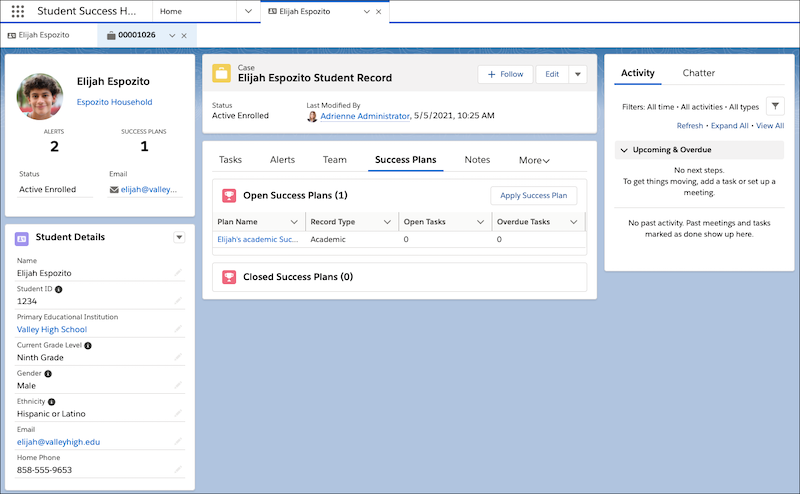
Student Success Hub also leverages standard Salesforce elements such as list views, page layouts, related lists, reports and dashboards, and more. You can use the preconfigured Student Success Hub app or you can customize the pages, Lightning components, and Salesforce elements that it comprises.
The administrative counterpart to the Student Success Hub app is the Setup interface. Admins perform most configuration tasks in Setup, but also work in the app to enter data or confirm configuration changes.
In orgs that are licensed and configured for student users and Experience Cloud sites, students experience Student Success Hub through a portal that's optimized for mobile devices. The portal connects students with members of their success team, lets them quickly schedule appointments with support staff, and helps students stay on top of their assigned Success Plans and Tasks.
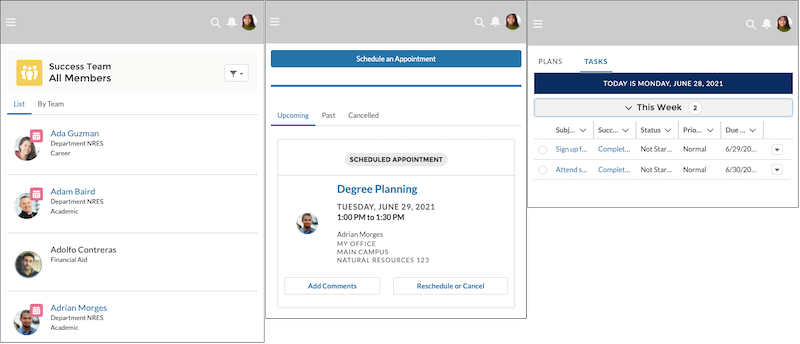
You build the portal by using Experience Cloud and a combination of standard and custom Lightning components. You also configure appropriate site access and membership. Students access the portal by using a personalized login URL.