
Complete these tasks to get Topic-based availability up and running in your Student Success Hub org.

- Learn About Topic-Based Availability
No one likes to talk about Christmas in June, and support staff typically don't conduct graduation audits in September. Help support staff optimize their scheduling through the seasons by using Topic-based availability, which lets them associate their recurring availability blocks with appointment Topics and Subtopics. - Topic-Based Availability Release Information
The Availability Topic object was released with Student Success Hub 2.46 (Winter '21). - Topic-Based Availability Requirements and Limits
Topic-based availability requires the location-based availability data model. Make sure it's set up first. - Set or Verify Object and Field Permissions for Topic-Based Availability
Topic-based availability requires access to the Availability Topic object. - Configure Sharing Settings for Topic-Based Availability
Verify your default organization-wide sharing settings for the Availability Topic object. - Understand the Support Staff Experience with Topic-Based Availability
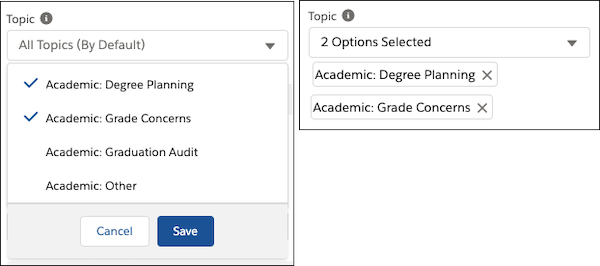
After permissions and sharing settings are configured for Availability Topic, support staff can choose from a multi-select Topic picklist on the New Availability form. The Topic picklist displays Topic:Subtopic pairs; support staff can select one, some, all, or none of the items. Choosing no Topics in the picklist is equivalent to selecting all Topics. As with selecting from the Location multi-select picklist in the New Availability form, support staff must save their selections before specifying the times and frequency of the recurring availability block.
Learn About Topic-Based Availability
No one likes to talk about Christmas in June, and support staff typically don't conduct graduation audits in September. Help support staff optimize their scheduling through the seasons by using Topic-based availability, which lets them associate their recurring availability blocks with appointment Topics and Subtopics.
For example, support staff can set up a recurring block during August and September dedicated to scheduling, and a different block for March through May dedicated to graduation audits. They can add additional Topics to those availability blocks as desired, so they can also be available to discuss study abroad planning, for example, whenever it's a hot topic with students.
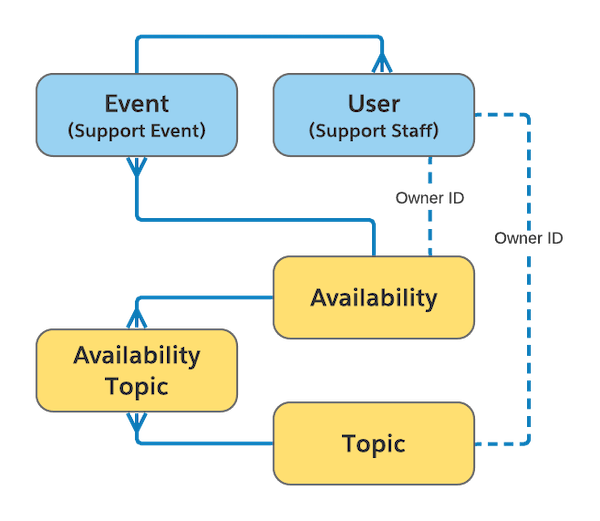
Topic-based availability uses the Availability Topic custom object, a junction object that relates a support staff member's Availability and Topic records. Here's how the Availability Topic object relates to Availability and Topic, as well as to the standard Salesforce Event and User objects, shown in blue.

Topic-Based Availability Release Information
The Availability Topic object was released with Student Success Hub 2.46 (Winter '21).
To get Topic-based availability up and running in your org, complete the tasks in this article.
Unless otherwise noted at the beginning of the task, all setup tasks are required regardless of the version of Student Success Hub that you originally installed. If you don't know which version you started with, see Keep Student Success Hub Up-to-Date.
Topic-Based Availability Requirements and Limits
Topic-based availability requires the location-based availability data model. Make sure it's set up first.
Relate fewer than 200 Availability Topics with each Availability. Exceeding this limit prevents you from deleting the Availability due to Salesforce platform query limits.
See Set Up Location-Based Availability for everything you need to do before continuing.
Set or Verify Object and Field Permissions for Topic-Based Availability
Topic-based availability requires access to the Availability Topic object.
See Configure Higher Ed Support Staff Permissions and Configure Student Permissions.
Configure Sharing Settings for Topic-Based Availability
Verify your default organization-wide sharing settings for the Availability Topic object.
Understand the Support Staff Experience with Topic-Based Availability
After permissions and sharing settings are configured for Availability Topic, support staff can choose from a multi-select Topic picklist on the New Availability form. The Topic picklist displays Topic:Subtopic pairs; support staff can select one, some, all, or none of the items. Choosing no Topics in the picklist is equivalent to selecting all Topics. As with selecting from the Location multi-select picklist in the New Availability form, support staff must save their selections before specifying the times and frequency of the recurring availability block.
When support staff schedule appointments using the Predefined Availability tab in the New Appointment form, they can choose any time slot in their recurring availability blocks, regardless of which Topics (and locations) they've associated with the blocks. This ability to override their defined Availability Settings gives support staff the greatest amount of flexibility and control over their scheduling. Students, however, can't override a staff member's Availability Settings when scheduling appointments in the portal.
When you enable Topic-based availability, encourage your support staff to review existing recurring availability blocks and update them with the appropriate Topics and Subtopics. By default, existing availability blocks are associated with all Topic and Subtopics.