Understand the custom Topic objects and how they're used in appointment scheduling in Student Success Hub orgs.

- Topic Objects and Appointment Scheduling
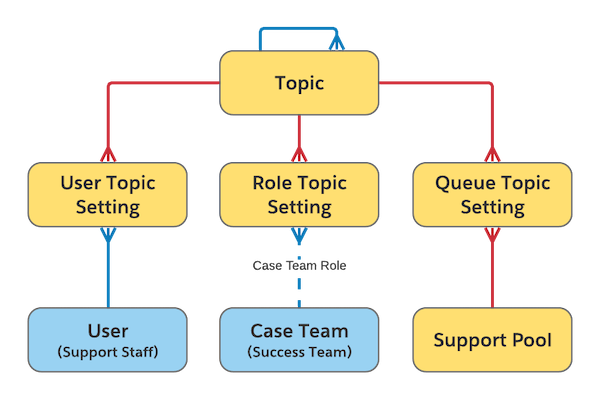
When support staff meet with students, the topics of discussion can be general, such as Academic, or specific, such as Degree Planning. To keep track of all the potential topics of discussion and use them as an organizing tool in appointment scheduling, set up the Topic objects: Topic, Role Topic Setting, User Topic Setting, and Queue Topic Setting (if you're using queue management). - Topic Object Definitions
Learn what information you can record in each Topic object. - Topic Objects' Entity Relationships
Learn how Topic objects relate to one another.
Topic Objects and Appointment Scheduling
When support staff meet with students, the topics of discussion can be general, such as Academic, or specific, such as Degree Planning. To keep track of all the potential topics of discussion and use them as an organizing tool in appointment scheduling, set up the Topic objects: Topic, Role Topic Setting, User Topic Setting, and Queue Topic Setting (if you're using queue management).
The Topic objects help determine who is available for what kinds of appointments, and when. For example, when a student requests an appointment and chooses the Academic topic, the Scheduling Wizard shows only support staff who are available to discuss the Academic topic. If the selected Topic has child topics defined, the student can also select from a list of Academic subtopics, such as Degree Planning, Grade Concerns, and Graduation Audit. A student requesting a Financial Aid appointment sees a different list of subtopics, such as Disbursement, Hardship, and so on. If support staff have designated different appointment durations for certain topics or subtopics, scheduling accounts for those conditions, too.
Similarly, departments using queue management to manage walk-in appointments see only the topics and subtopics that are relevant to their department. For example, when someone at the Career Services front desk adds a student to a queue, they see only Career topics and subtopics such as Full-Time Jobs and Internships.
Topic Object Definitions
Learn what information you can record in each Topic object.
- Topic
- Defines the topics of discussion during appointments.
- Role Topic Setting
- Relates Topics to the roles that you defined for case team members when you set up success teams (roles such as Academic, Financial Aid, and so on). Only Topics can be related to roles; Subtopics can't be related.
- Queue Topic Setting
- When using queue management, relates Topics to the Support Pools that you created to manage appointments for a group of users, including support staff members and one-stop shops for front desks.
- User Topic Setting
- Relates Topics to the varying appointment lengths that individual support staff members specify for different Topics.