
Education Cloud uses the power of Experience Cloud and the flexibility of Omnistudio to let you customize the appointment experience for your users.
| Available in: Lightning Experience |
| Available in: Enterprise, Performance, Unlimited, and Developer Editions with Education Cloud |
- Omniscript Appointment Setup Flow
Use the default Omniscript, or customize it to best suit your needs. Flexcards enable you to display or record more user data in the system, or even remove preconfigured data. When you're happy with your setup flow, enable it on your Experience site. - Appointment View for Your Learners and Staff
When your learners and staff members log in to the self-service portal, Salesforce shows their past and upcoming appointments, providing them with a comprehensive view of their schedule.
Omniscript Appointment Setup Flow
Use the default Omniscript, or customize it to best suit your needs. Flexcards enable you to display or record more user data in the system, or even remove preconfigured data. When you're happy with your setup flow, enable it on your Experience site.
| Available in: Lightning Experience |
| Available in: Enterprise, Performance, Unlimited, and Developer Editions with Education Cloud |
Learners access appointment scheduling via an Experience site, while staff do so from the learner's person account record.
See Also:
Appointment View for Your Learners and Staff
When your learners and staff members log in to the self-service portal, Salesforce shows their past and upcoming appointments, providing them with a comprehensive view of their schedule.
| Available in: Lightning Experience |
| Available in: Enterprise, Performance, Unlimited, and Developer Editions with Education Cloud |
If you build your own app, add the My Appointment component to the app’s utility bar to provide that view. See Add the My Appointment Component to Your App Utility Bar.
If you configure video calls with AWS Chime, users can start the call directly from the appointment utility. For video calls using external services, Salesforce shows the information from the Appointment Booking URL field.
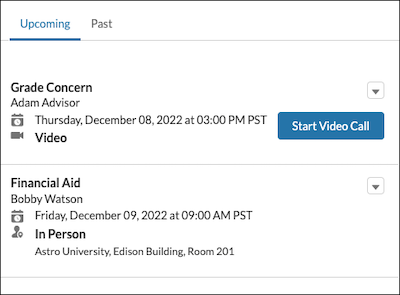
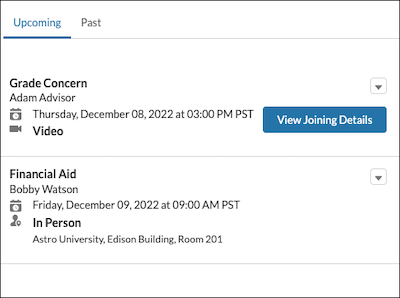
By default, the self-service portal shows to learners:
- The name of the meeting attendees.
- The appointment topic and subtopic if it exists.
- The scheduled start time in their local time zone.
- The appointment channel and location.
Salesforce doesn’t show canceled appointments.
Learners can join virtual appointments when all these conditions are met:
- The appointment status is In Progress or Scheduled.
- The current time is between the Earliest Start Permitted and Due Date times of the service appointment.
See Also: