
Set up learning records and equivalencies to evaluate applicants’ prior learning for transfer credit. Map source achievements to the achievements your institution grants, then publish and activate the equivalency. These rules serve as the source of truth for your articulation and admissions staff.
Required Editions
| Available in: Lightning Experience |
| Available in: Enterprise, Performance, Unlimited, and Developer Editions with Education Cloud |
| User Permissions Needed | |
|---|---|
| To prepare data for transfer credits: | Education Cloud Full Access permission set |
To establish a functional rule, configure these objects.
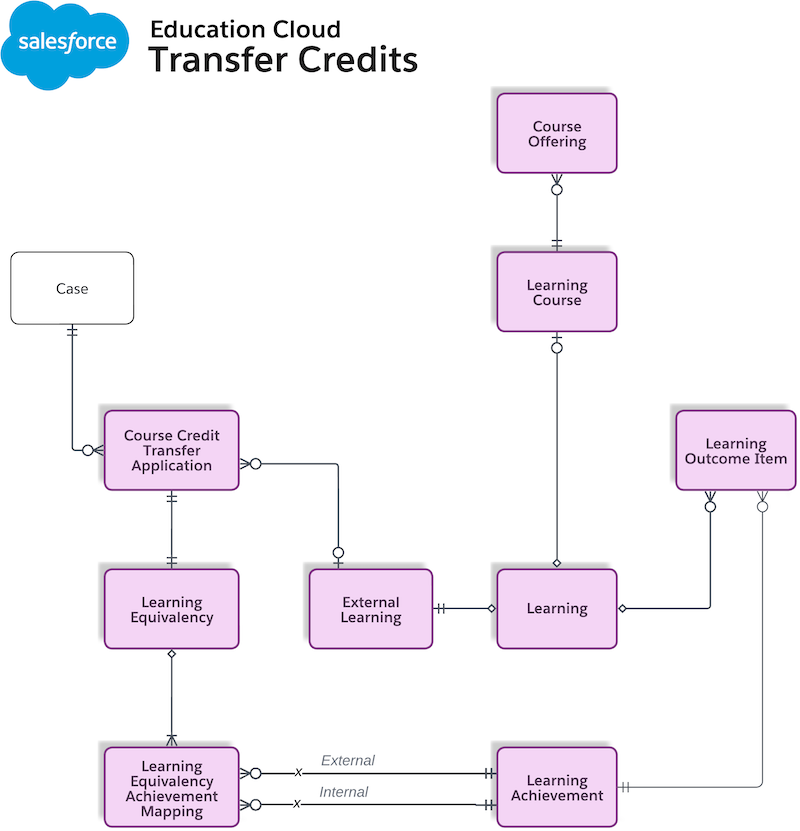
Before establishing equivalency rules, model external and internal curricula with learning, achievement, and outcome records.
- Define a high-level learning to identify the curriculum subject matter, such as Introductory Psychology.
- Create an external learning record to track learning activities offered by an external organization or institution. External learning is a child of the learning object.
- Create a learning course to represent a formal course offered by a college or university.
- Create a learning achievement to represents the recognized result of a learning activity.
- Generate a learning outcome item to connect a learning record to a learning achievement. This record defines the learning outcomes (skills or knowledge) that are satisfied when an achievement is earned.
- Create a learning equivalency to define the relationship between your institution and an external provider. This record tracks the agreement status and valid date ranges.
- Create a learning equivalency achievement mapping to specify the source achievement (from the applicant) and the target achievement (granted by your institution).
Create Learning Records

-
Create a learning record for any academic activity to represent the high-level subjects
for both the source and target institutions.
- From the App Launcher, find and select Learnings.
- Click New.
- Enter a name for the learning.
- For courses coming from other institutions, select External Learning as the type.
- Select the institution that provides the learning as the provider.
- Enter the learning details.
- Save your changes.
-
If the learning type is External Learning, define the specific external details.
- From the App Launcher, find and select Learnings.
- Select an learning record where the learning type is External Learning.
- On the Related tab, in the External Learnings section, click New.
- Enter a name for the external learning.
- Enter a unique identifier and select a field of study.
- Select the type of external learning.
- Save your changes.
Connect Learnings to Achievements
To help applicants earn credit for their work, connect a learning to a learning achievement by using the learning outcome item. Define a source learning achievement for an external course and a target learning achievement for an internal course.
-
Create learning achievement records to represent the successful completion of the external
course and the internal course.
- From the App Launcher, find and select Learning Achievements.
- Click New.
- Select Achievement Group as the record type.
- Enter a name for the learning achievement.
- Enter all relevant information about the new learning achievement.
- Save your changes.
-
Similarly, create additional learning achievements for the Achievement Group
All, Learning Course, or Learning
Program record types.
Note Use Achievement Group All record type if multiple courses are required (AND condition) to earn one credit.
-
To connect the external and internal learnings and achievements, create learning outcome item records.Note Use the External Learning Wizard to create external learnings and relate them to learning outcomes. See Define External Learning by Using the External Learning Wizard.
- From the App Launcher, find and select Learning Outcome Items.
- Click New.
- Select the learning associated with an external learning.
- Select the learning achievement for the required learning record type.
- Enter the minimum letter grade and minimum numeric grade.
- Enter the outcome item details.
- Save your changes.
- Similarly, create a learning outcome item record for an internal learning to identify the achievement that an applicant earns after a successful transfer.
Define External Learning by Using the External Learning Wizard
Use the External Learning Wizard to create external learnings, relate them to key and additional learning outcomes, and set valid date ranges and duration.
- From the App Launcher, find and select External Learning.
- Click New from External Learning Wizard.
- Enter a name for the external learning.
- Select the active dates.
- Enter the duration to complete the learning and select a duration unit.
- Select an academic level.
- Enter a unique identifier and select a field of study.
- Select the type of external learning.
- Enter a description.
- Click Next.
- Define key learning outcomes. If there are multiple outcomes, set one as primary.
- Define additional learning outcomes.
- Click Create External Learning.
Create a Learning Equivalency
Define a relationship between your institution and an external provider to track the agreement status and valid date ranges.
- From the App Launcher, find and select Learning Equivalencies.
- Click New.
- Enter a name for the learning equivalency.
-
Select a type of learning equivalency.
- To make the learning equivalency available to all learners, select General.
- To create custom methods, select Discrete.
- To apply the rule only for credits earned during valid periods, enter the Start Date and End Date.
-
Save your changes.
Note You can't publish and activate a learning equivalency at the same time. Create the learning equivalency without publishing, map it to an achievement, and then publish and activate the record.
Define Learning Equivalency by Using the Learning Equivalency Wizard
Use the Learning Equivalency Wizard to define relationships between external and internal learnings and the learning programs, and the valid date ranges for the learning equivalency.
- From the App Launcher, find and select Learning Equivalencies.
- Click New from Learning Equivalency Wizard.
- On the External Learnings tab, click Add External Learning to map the external learning from transferring institutions to your internal learning. Select external learning and enter the learning information, such as minimum letter and numeric grades, duration and duration unit. Select the equivalency logic, and add more external learnings if needed.
- On the Internal Learnings tab, click Add External Learning to select internal learning equivalent to the selected external learning. Select the internal learning and enter the learning information, such as minimum letter and numeric grades, duration and duration unit. Select the equivalency logic, and add more internal learnings if needed.
- On the Learning Program Requirements tab, select learning program requirements for the learning equivalency. Make this equivalency available for all learning programs, or restrict to specified learning programs.
- On the Learning Equivalency Details tab, enter the learning equivalency information, such as name, type, start and end dates, and learning category.
- Save your changes.
Map Achievements
To define the logic used to articulate and suggest credits, specify the source achievement from the applicant and the target achievement granted by your institution.
- From the App Launcher, find and select Learning Equivalency Achievement Mappings.
- Click New.
- Select the learning equivalency.
- Select a source learning achievement for the external course.
- Select a target learning achievement for the internal course.
- Save your changes.
Publish and Activate the Learning Equivalency
After mapping the learning equivalency to learning achievements, publish and activate the record to make it available for credit suggestions.
- From the App Launcher, find and select Learning Equivalencies.
- Select the learning equivalency mapped to the source and target learning achievements in learning equivalency achievement mapping.
- From the actions menu, select Edit.
- To publish the learning equivalency, select Published.
- Save your changes.
- To activate the published learning equivalency, select Active.
- Save your changes.
Example 1: Standard 1:1 Course Equivalency
To map an applicant’s English Composition 1 credit from Greenwich Bay Community College to Connected Campus ENGL 1001, follow these steps.
-
Create a learning record for English Composition 1 at Greenwich Bay Community.
Field Source Learning Value Name English Composition 1 Description Foundational writing course Type External Learning Provider Greenwich Bay Community College Duration 3 Duration Unit Credit Hours -
Create a learning record for ENGL 1001 at Connected Campus.
Field Target Learning Value Name ENGL 1001: Writing I Description Internal core writing requirement. Type Learning Course Provider Connected Campus Duration 3 Duration Unit Credit Hours -
Create external learning and learning course records to link the details to the learning
records.
External Learning
Field External Learning Value Name GBCC ENG 101 Detail Learning English Composition 1 Type Education Description Standard freshman composition Status Transferable Learning CourseField Learning Course Value Name ENGL 1001 - Writing I Learning ENGL 1001: Writing I -
Create a source learning achievement record.
Field Source Achievement Value Name Completed ENG 101 (GBCC) Record Type Achievement Group All Issuer Greenwich Bay Community College -
Create a target learning achievement record.
Field Target Achievement Value Name Credit for ENGL 1001 (CC) Record Type Achievement Group All Issuer Connected Campus -
Link the English Composition 1 learning to the Greenwich Bay Community College’s ENG 101
achievement by using a learning outcome item.
Field Source Outcome Item Value Learning English Composition 1 Learning Achievement Completed ENG 101 (GBCC) Minimum Numeric Grade 8 Minimum Letter Grade B -
Link the ENGL 1001 learning to the Connected Campus ENGL 1001 achievement by using a
target learning outcome item.
Field Target Outcome Item Value Learning ENGL 1001: Writing I Learning Achievement Credit for ENGL 1001 (CC) Minimum Numeric Grade – Minimum Letter Grade TC -
Create a Standard Writing Equivalency learning equivalency record.
Field Value Name GBCC ENG 101 to CC ENGL 1001 Type General Start Date 12/01/2025 -
Create a learning equivalency achievement mapping.
Field Value Learning Equivalency GBCC ENG 101 to CC ENGL 1001 Source Completed ENG 101 (GBCC) Target Credit for ENGL 1001 (CC) -
Publish and activate the learning equivalency.
Field Value Name GBCC ENG 101 to CC ENGL 1001 Active True Published True
Example 2: Complex Many-to-Many Mapping
To map an applicant’s ENG 101 AND ENG 102 credit from Greenwich Bay Community College (GBCC) to Connected Campus (ENGL 1001 AND 1002) OR (COMM 1001 AND 1002), follow these steps.
-
Create learning records.
Learning Record Field Values Source Learning 1 - Name: English Composition 1
- Type: External Learning
- Provider: Greenwich Bay Community College
- Duration: 3
- Duration Unit: Credit Hours
Source Learning 2 - Name: English Composition 2
- Type: External Learning
- Provider: Greenwich Bay Community College
- Duration: 3
- Duration Unit: Credit Hours
Target Learning 3 - NameENGL 1001: Writing I
- Type: Learning Course
- Provider: Connected Campus
- Duration: 3
- Duration Unit: Credit Hours
Target Learning 4 - NameENGL 1002: Writing II
- Type: Learning Course
- Provider: Connected Campus
- Duration: 3
- Duration Unit: Credit Hours
Target Learning 5 - NameCOMM 1001: Intro to Comm
- Type: Learning Course
- Provider: Connected Campus
- Duration: 3
- Duration Unit: Credit Hours
Target Learning 6 - Name COMM 1002: Public Speaking
- Type: Learning Course
- Provider: Connected Campus
- Duration: 3
- Duration Unit: Credit Hours
-
Create external learning and learning course records to link the details to the learning
records.
External Learnings: Link the external learning to the source learnings.
Learning Record Name Field Values English Composition 1 - Learning: English Composition 1
- Type: Education
- Status: Transferable
- Duration: 3
- Duration Unit: Credit Hours
English Composition 2 - Learning: English Composition 2
- Type: Education
- Status: Transferable
- Duration: 3
- Duration Unit: Credit Hours
Learning Courses: Link the learning courses to the target learnings.
Learning Course Name Field Values ENGL 1001: Writing I - Learning: ENGL 1001: Writing I
- Course Number: 1001
- Subject Abbreviation: ENGL
ENGL 1002: Writing II - Learning: ENGL 1002: Writing II
- Course Number: 1002
- Subject Abbreviation: ENGL
COMM 1001: Intro to Comm - Learning: COMM 1001: Intro to Comm
- Course Number: 1001
- Subject Abbreviation: COMM
COMM 1002: Public Speaking - Learning: COMM 1002: Public Speaking
- Course Number: 1002
- Subject Abbreviation: COMM
-
Create a source learning achievement record. Create achievements that group individual
courses together.
Field Source Achievement Target Achievement A Target Achievement B Name GBCC Writing Bundle (101 & 102) CC English Core (1001 & 1002) CC Comm Core (1001 & 1002) Record Type Achievement Group All Achievement Group All Achievement Group All Issuer Greenwich Bay Community College Connected Campus Connected Campus Field of Study English English Communication Note Use the Achievement Group All record type if an applicant is to complete every course (AND condition) linked to that achievement. Use the Achievement Group record type, or any designated OR record type if any one course in the group satisfies the requirement. -
Link the learnings to the achievements by using learning outcome items.
Learning (Master) Learning Achievement (Parent) Minimum Numeric Grade Minimum Letter Grade English Composition 1 GBCC Writing Bundle (101 & 102) 8 B English Composition 2 GBCC Writing Bundle (101 & 102) 8 B ENGL 1001: Writing I CC English Core (1001 & 1002) – TC ENGL 1002: Writing II CC English Core (1001 & 1002) – TC COMM 1001: Intro to Comm CC Comm Core (1001 & 1002) – TC COMM 1002: Public Speaking CC Comm Core (1001 & 1002) – TC Note Minimum grade information is required only on the source records. -
Create a learning equivalency record.
Field Value Name GBCC to CC Multi-Path Writing Agreement Type General Start Date 12/01/2025 -
Create learning equivalency achievement mappings.
Learning Equivalency Achievement Mapping Learning Equivalency Source Achievement Target Achievement GBCC to CC Mapping 1 GBCC to CC Multi-Path Writing Agreement GBCC Writing Bundle CC English Core (1001 & 1002) GBCC to CC Mapping 2 GBCC to CC Multi-Path Writing Agreement GBCC Writing Bundle CC Comm Core (1001 & 1002) Note The same source achievement is used in both the learning equivalency achievement mappings. If one source can lead to multiple target options, create multiple learning equivalency achievement mapping records pointing to the same source, but different targets. -
Publish and activate the learning equivalency.
Field Value Name GBCC to CC Multi-Path Writing Agreement Active True Published True