
Use Education Cloud objects to model your institution's learnings, courses, course offerings, and schedules.
| Available in: Lightning Experience |
| Available in: Enterprise, Performance, Unlimited, and Developer Editions with Education Cloud |
| User Permissions Needed | |
|---|---|
| To model courses and curricula: | Education Cloud Full Access |
Modeling courses and curricula in Education Cloud relies on these objects:
| Object | What the Object Represents |
|---|---|
| Learning | Information that defines a curriculum that can be made available as a course, program, or on-site experience for a contact. |
| Learning Course | Information about a course that's required in a learning framework. |
| Learning Program | Information about curricula in a program that's required to obtain a credential. |
| Course Offering | An instance of a training course with location and date details of the training course. |
| Course Offering Schedule | Information about the schedule defined for a course offering. |
This diagram shows how these objects relate to one another:
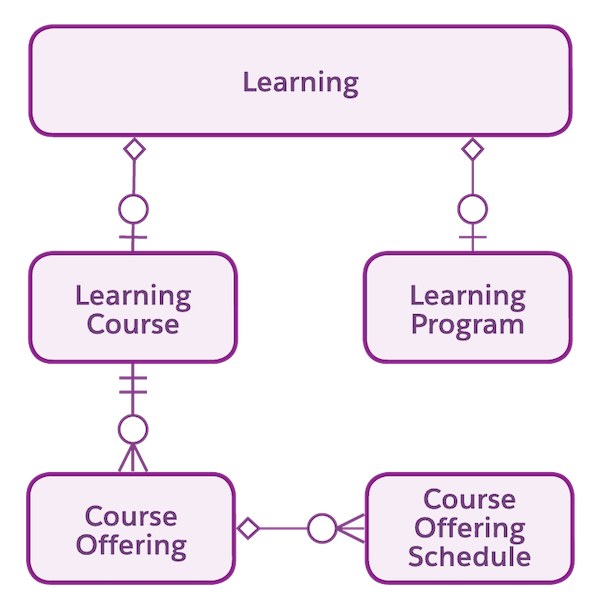
Learnings and Learning Courses
Learning represents information about a curriculum that you can make available to a contact as a course, program, or on-site experience.
When you create a new learning record, designate whether it's represented as a learning program or learning course. For example, Biology 101 could be a learning program, or it could be an individual learning course. Astro University has Biology 101 as part of their curriculum, so they create a learning record for Biology 101. When they create that learning record, they decide that Biology 101 is best represented as a learning course. Next, they create a learning course record for Biology 101, which stores details such as course number, field of study, and course level.
Course Offerings
A course offering makes a learning course concrete in time and space.
The course offering record provides specific details, including the academic session, faculty, location, start and end dates, and so on. In our example, Astro University creates a course offering record for each instance of Biology 101 that learners can choose.
Course Offering Schedule
After you create a course offering, it's important that students know when and where to show up for class. A course offering schedule captures these details and schedule variations.
For example, on Mondays, Wednesdays, and Fridays, class meets from 1-2 PM in Dixit Building, Lecture Hall A. On Tuesdays and Thursdays, it meets from 2-3:30 PM in the adjacent Data Lab. Model these day-by-day schedule variations using two course offering schedules. One course offering schedule record (CSH-149723) accounts for the Monday, Wednesday, and Friday occurrences. A second course offering schedule record (CSH-149724) accounts for the Tuesday and Thursday occurrences.
Manage your course offerings in the Academic Operations app.
SEE ALSO: