Learners access the Intelligent Program Comparison Engine through your Education Portal, either directly from the page that houses the engine or from the Summary page of a learning program. Staff, such as advisors, access the engine using a button that you add to an object layout, for example Case.
| Available in: Lightning Experience |
| Available in: Enterprise, Performance, Unlimited, and Developer Editions with Education Cloud |
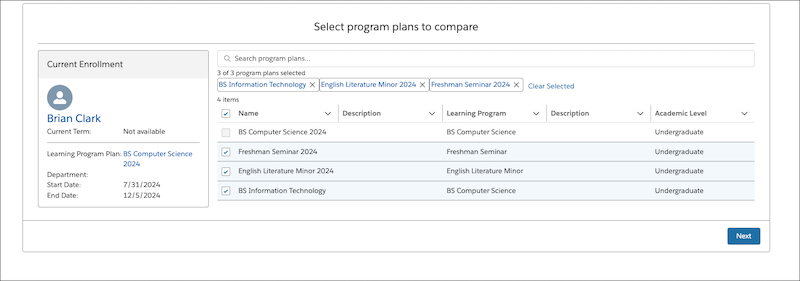
Learners and advisors can choose up to three program plans to compare, with the option to include the one that a learner is currently enrolled in.
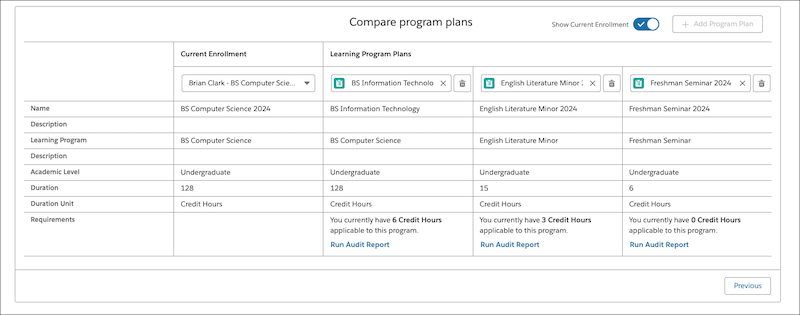
The Intelligent Program Comparison Engine provides a detailed view of the requirements that the learner has fulfilled against each program.
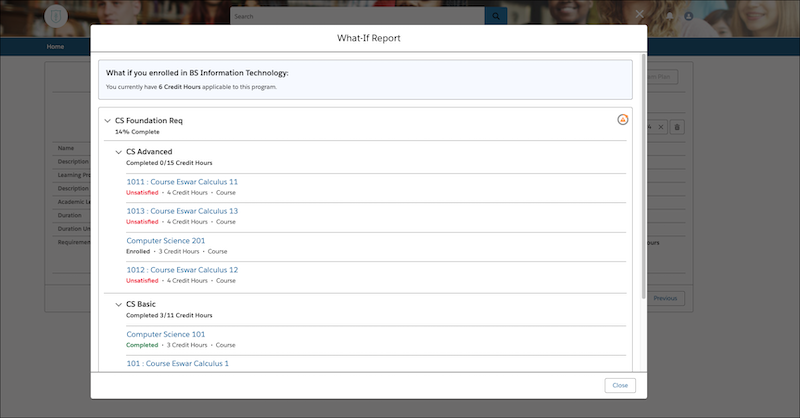
Learners and advisors can also generate, download, and print a What-If report for a detailed audit of a program's required and elective coursework, and the elements that the learner fulfilled.