
Build philanthropic relationships by using Fundraising objects to identify, track, and act on data of a person or an organization.
Required Editions
| REQUIRED EDITIONS |
|---|
| Available in: Lightning Experience |
|
Available in: Enterprise, Performance, Unlimited, and Developer Editions with Education Cloud |
| User Permissions Needed | |
|---|---|
| To work with philanthropic records: |
Create a Party Philanthropic Indicator Record
Party Philanthropic Indicator records represent an unconfirmed or soft indication that highlights a person's wealth or growth potential. If you have a person or organization whose involvement makes them a good candidate for building a relationship, create a Party Philanthropic Indicator record for that account.
- From the account page for a person or an organization, on the Party Philanthropic Indicators related list, click New.
- Enter the relevant information, and then save your changes.
Create a Party Philanthropic Assessment Record
Party Philanthropic Assessment records represent a formalized assessment of wealth when a rating takes place, such as a third-party wealth assessment, a property valuation, a financial asset assessment, or an internal assessment.
- From the account page for a person or an organization, under Party Philanthropic Assessments, click New.
- Enter the relevant information, and then save your changes.
Create a Party Philanthropic Occurrence Record
Launch a flow from a Party Philanthropic Indicator record to create a Party Philanthropic Occurrence record for a person or an organization. Party Philanthropic Occurrence records represent a confirmed or financially quantifiable occurrence in which a person’s wealth changes.
Before you create an occurrence record, review the party philanthropic assessment records for the account, and make sure you have enough information to move forward with that person or organization.
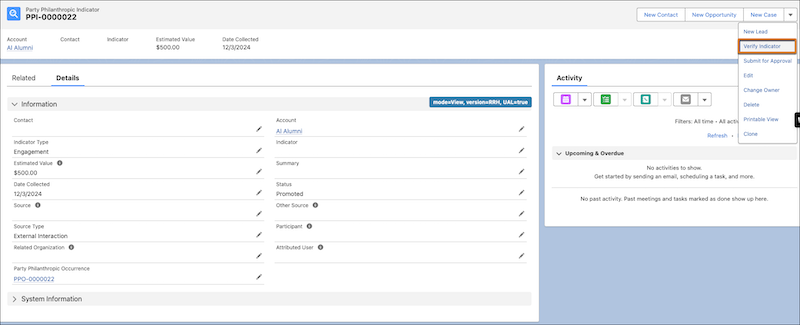
- From the account page for an individual or organization, open a Party Philanthropic Indicator record.
-
Click Verify Indicator.
The flow creates a Party Philanthropic Occurrence record for the individual or organization and updates the status of the Party Philanthropic Indicator record to Promoted.
Create a Party Philanthropic Milestone Record
Run a schedule-triggered flow to create a Party Philanthropic Milestone record based on the current date, fiscal year, and constituent role types passed into the flow.
Run the Prospect Research: Create Party Philanthropic Milestone flow. See Philanthropic Research Automation.