
Set up benefits for your mentoring program.
| Available in: Lightning Experience |
| Available in: Enterprise, Performance, Unlimited, and Developer Editions with Education Cloud |
| User Permissions Needed | |
|---|---|
| To create Mentoring benefits: | Education Cloud Full Access |
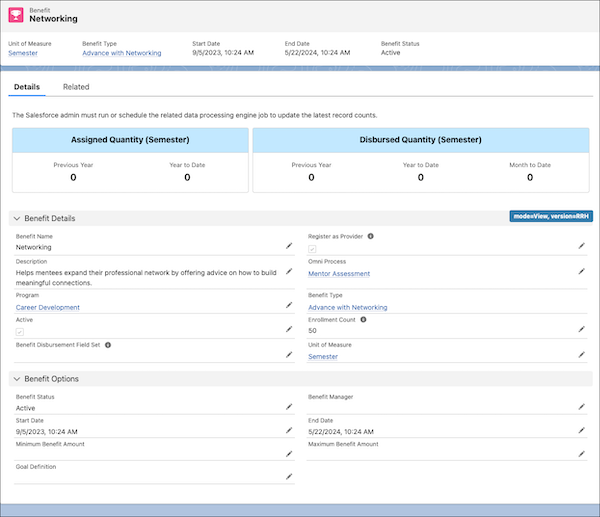

Note Add the Register as a Provider and Omni Process fields to the Benefit page layout. See Page Layouts.
- From the App Launcher, search for and select Benefits.
- Click New.
- Enter a name and description for the benefit.
- To allow a user to register as a benefit provider on an Experience Cloud site, select Register as Provider.
- If you're adding an assessment, for OmniProcess, find and select the name of your assessment OmniScript.
- Select the program that this benefit applies to.
- Select a benefit type for the benefit. For example, select Mentoring.
- To make this benefit available to users, select Active.
-
For Enrollment Count, enter the number of instances for the benefit.
For example, if you're measuring by individual sessions, enter the total number of sessions that this benefit covers.
-
In Benefit Disbursement Field Set, enter the API name of the field set that contains benefit-specific fields on the Benefit Disbursement object.
These field sets allow program managers to view additional fields from the field set when they track participant attendance.
-
Find and select the unit of measure for the benefit.
Examples include hours, sessions, semesters, or whatever works for your institution.
- Select the status of the benefit.
- In Benefit Manager, find and select the person who oversees this benefit.
- Enter a start date and time, and an end date and time, for the benefit.
- In Minimum Benefit Amount, enter the lowest number of instances that satisfy the benefit.
- In Maximum Benefit Amount, enter the highest number of instances that are allowed for this benefit.
-
Find and select the goal definition that outlines the hierarchy of goals for the mentoring benefit.
For example, if the mentoring benefit is Skills Development, the goal definition can show the top desired skill along with the intermediate skills that are required to attain that top skill.
- Save your changes.