
Configure your own page layout for the Transaction Journal object to best fit your users' needs, and assign them to your user profiles.
| Available in: Lightning Experience |
| Available in: Enterprise, Performance, Unlimited, and Developer Editions with Accounting Subledger |
| User Permissions Needed | |
|---|---|
| To create page layouts: | Customize Application |
| To assign page layouts: | Manage Profiles and Permission Sets |
Configure Page Layouts
- From the object management settings for transaction journal, go to Page Layouts, and then click New.
- Enter a page layout name, and then save your changes.
- We recommend that you add at least these fields and any custom fields that you added:
- Accrual Journal Entry
- Booking Date
- Created By
- Credit Amount
- Comment
- Debit Amount
- Due Date
- External Transaction ID
- Fund Account Value
- General Ledger Code
- Journal Type
- Last Modified Date
- Payment Date
- Payment Method
- Transaction Amount
- Write Off Journal Entry
 Note The Booking Date is the transaction date of the transaction journal record.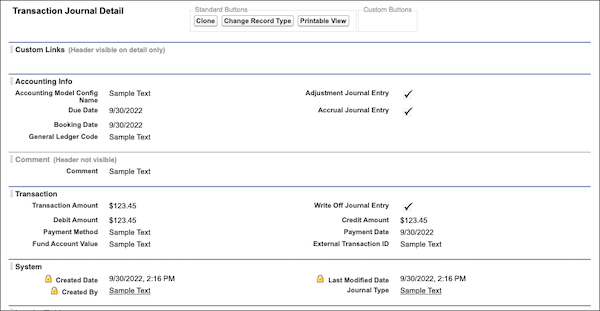
- Save your changes.
Assign Page Layouts
- If you're not already on the Page Layouts page, from the object management settings for transaction journal, go to Page Layouts, and then click Page Layout Assignment.
- Click Edit Assignment.
- From the Page Layout To Use dropdown list, select the page layout that you created.
- Select the rows for all profiles that can view transaction journal records.
- Save your changes.
See Page Layouts.