
If the AWS account is inaccessible and you can’t log in, use the Connect APIs to update the primary phone number of the AWS sub-account.
Required Editions

Note If you need to update both the primary phone number and root email address associated with
your AWS account, make sure to first update the root email address before continuing with these
steps.
This article applies to:
- Salesforce Voice with Amazon Connect
| View supported editions. |
| User Permissions Needed | |
|---|---|
| To reset account phone number: |
Customize Application AND Modify All Data |
- Log in as an admin.
-
Use your preferred method to trigger the connect API to update the phone number.
- Endpoint:
/services/data/{SaleforceAPIVersion}/connect/voice/aws-account/phone-number/reset. Make sure that the API version is 67.0 or later. - Payload:
{"awsAccPhoneNumber":"+1234567890"}
- Endpoint:
-
In the request payload, provide the new phone number. For the required format, see Phone Number Requirements.
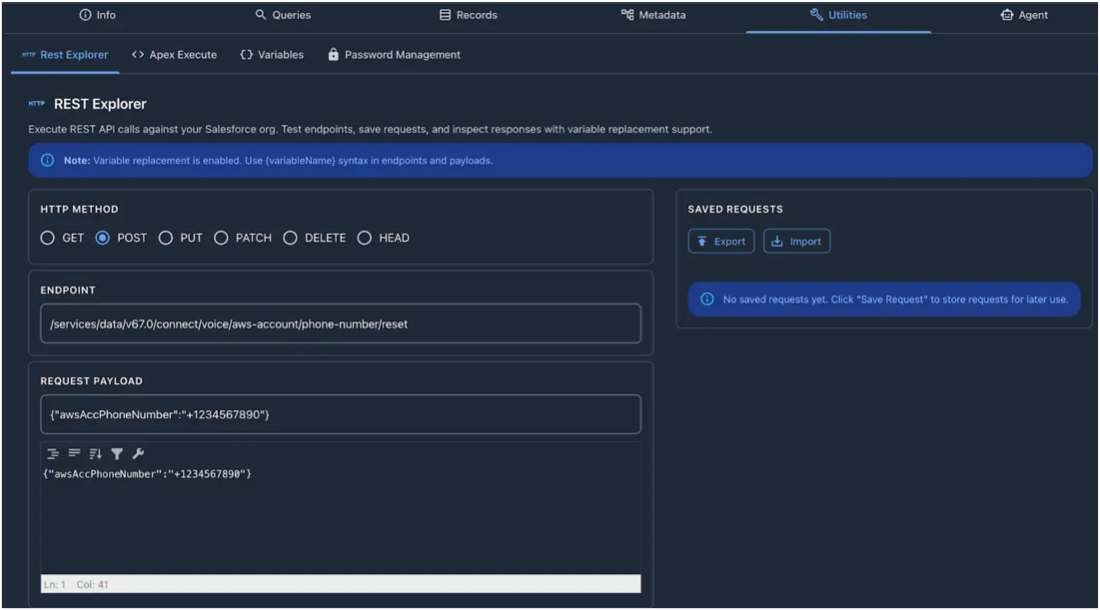
Triggering the API sends an email notification about the phone number change request to all the admins of the org.
After updating the phone number, you can use it to log in to the AWS account.