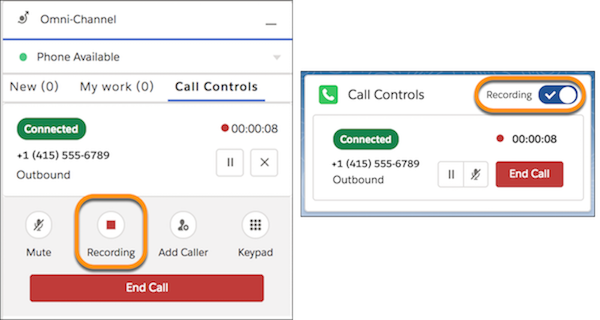
Some companies automatically record calls for training and quality purposes. Your
customers and your company sometimes prefer not to record certain information for privacy and
legal compliance reasons. Honor your customer’s privacy and protect your company when a call is
recorded by pausing the recording when sensitive information is exchanged. Resume the recording
when it’s appropriate.
Required Editions
This article applies to:
- Salesforce Voice with Amazon Connect
- Salesforce Voice with Partner Telephony
- Salesforce Voice with Partner Telephony from Amazon Connect
| User Permissions
Needed |
| To pause and resume call recordings: |
Control Call Recordings |
The default setting for call recording depends on your telephony provider and its
configuration. For Amazon Connect, call recording is turned on by default. If your company
is using the sample Amazon Connect contact flows that Salesforce provides, then call
recording begins when the call is connected to a rep. An administrator can configure when
calls are recorded in the contact flows in Amazon Connect.
-
To pause the recording, click Recording in the Omni-Channel utility
or the Recording radio button in the Phone component.
-
To resume recording, click the button again.