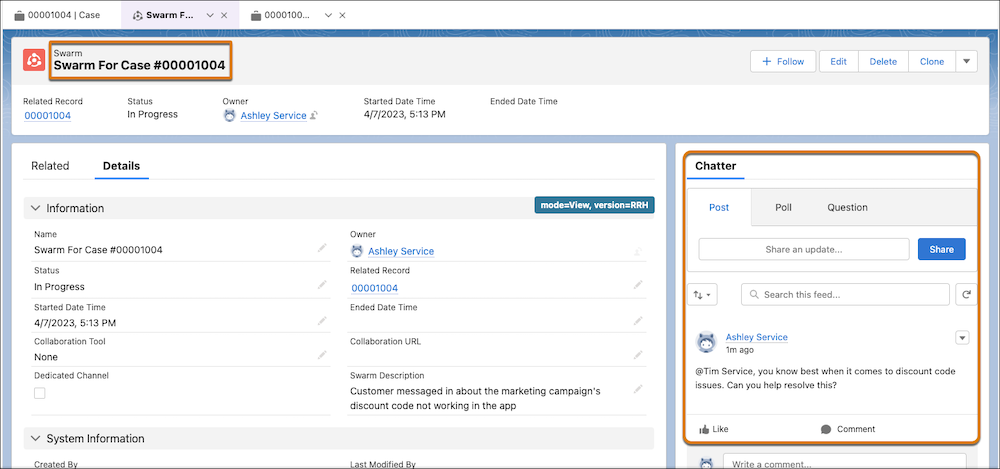
Collaboration with swarming starts when a support rep sends a swarm request to get help
to resolve an issue. Start a swarm from a record in Salesforce and collaborate with experts from
the swarm record’s feed.
Required Editions
-
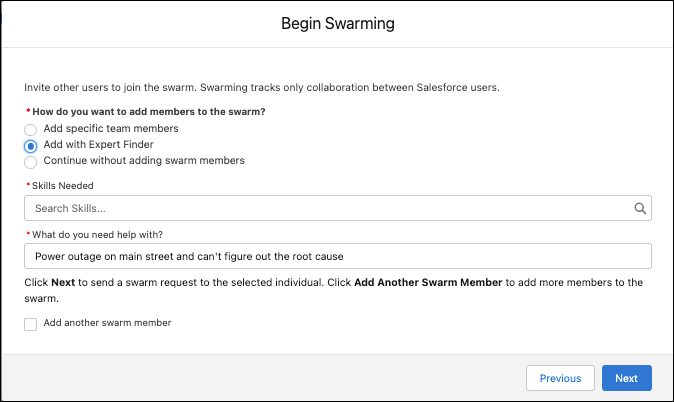
Select the Begin Swarming flow action. It may be a quick action,
dynamic action, or in the Actions & Recommendations panel.
-
Choose how you’d like to add members to the swarm. To add specific team members, select the
corresponding option, and then enter their name.
Expert Finder uses skills-based routing to find the person with the right skills
and availability and capacity to get the job done.
-
Select the Add another swarm member checkbox, and then enter
details for each person you want to add to the swarm. Then click
Next to create your swarm record.
-
Enter a description of the issue, such as, I need help with a Java and Perl issue, and
then click Next.
-
Start a conversation with experts in the Chatter feed.