Turn on Real-Time Translations to translate service plans into service reps' preferred language.
Required Editions
| View supported editions. | |
 This article applies to: This article applies to:
|
Service Assistant for Case with guidance plans only. |
 This article doesn't apply to: This article doesn't apply to:
|
|
| User Permissions Needed | |
|---|---|
| To set up Real-Time Translations for Service Assistant: | Service Planner Builder permission set. |


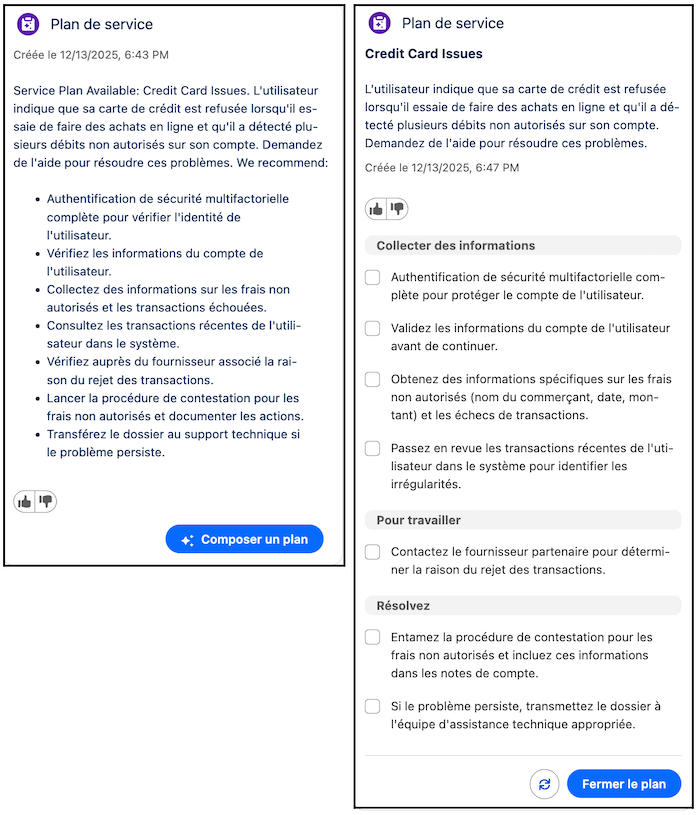
By default, all service plans are drafted in your company's preferred language when the language is supported by Prompt Builder. See Supported Languages in Prompt Builder. To have service plans translated into your service reps' preferred language, turn on Real-Time Translations and assign them the Service Plan Translation permission set.
Service Assistant supports the same languages as Real-Time Translations. A full list of languages is provided in Considerations for Real-Time Translations. If a service rep's preferred language isn't supported, service plans always show in English.
- On the Service Assistant Setup page, on the Case tab, in the Customize Experience by Object section, go to the Turn on Real-Time Translations section.
- Click Go to Real-Time Translations.
- On the Real-Time Translations Setup page, under Get Started with Real-Time Translations, turn on Translate Service Plans.
- Assign service reps the Service Plan Translation permission set.
When Real-Time Translations is turned on and service reps have the required permissions, Service Assistant automatically translates all text in a service plan into their preferred language when service reps:
- Open a new case and a case summary is drafted.
- Draft or redraft a service plan.
- Open a case with an existing case summary or drafted service plan.
Considerations
- The translation of service plans into a service rep's preferred language isn't saved as a permanent version. Translated service plans are generated in real time and are visible only to the service rep working the service plan. If a different service rep opens the same case, a new real-time translation occurs and the plan is shown in their preferred language. When the service rep's preferred language isn't supported or they don't have the required permission set, the plan language is shown in your company's default language or English when your company language isn't supported in Prompt Builder.
- Translation of the subagent name included in the service plan summary isn't supported. The text is always shown in English. The subagent name is shown in two places: the start of the case summary and above the summary in a drafted service plan.
- If you use Real-Time Translations for Messaging and provide a custom terminology file, the file isn't available for use in Service Assistant.
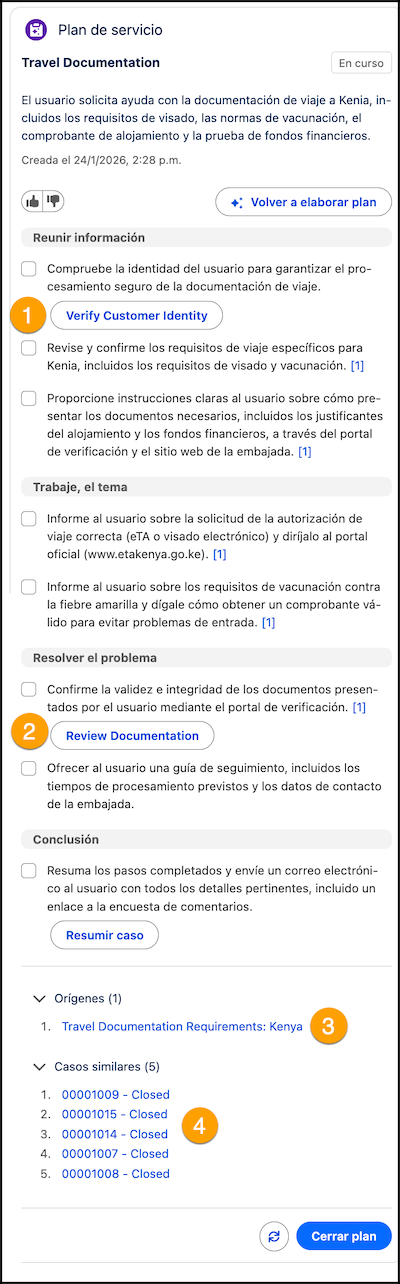
- If you ground Service Assistant with quick actions and use custom quick actions, the names of the quick actions surfaced in the plan steps aren't translated (1-2). The names are shown in English. To translate the names of your custom quick actions, see Translate Metadata Labels.
- If you ground Service Assistant in your knowledge articles, translation of the knowledge article names listed in the Sources section isn't supported (3). The names of the knowledge articles are always shown in English. The "Sources" heading is translated. See Knowledge Grounding.
- If you set up the similar cases feature, the case statuses aren't translated (4). By default, the list always shows the number and status. The "Similar Cases" heading name is translated. See Set Up Similar Cases.