
Service Assistant gives service reps AI-generated resolution guidance through a service plan, plus additional resolution support through capabilities.
Required Editions
| View supported editions. | |
 This article applies to: This article applies to:
|
Service Assistant for Case, Messaging, and Voice. |
- Service Plan Types
- Plan Type Comparison
- Service Plan Grounding
- Optional Features for Case Service Plans
Service Assistant is a proactive AI agent on the case, messaging session, voice call record pages. It surfaces resolution guidance in the Service Assistant component, a Lightning web component that shows as a panel on the record page. Within the component, Service Assistant brings together everything a service rep needs to resolve the record: the service plan and any capabilities you turn on, each shown as its own card.
The core feature of Service Assistant is the service plan. A service plan contains a summary of the record and step-by-step resolution guidance for service reps, grounded in your company data, such as subagents and knowledge articles. Service Assistant generates a service plan for each record that meets your defined eligibility criteria, a set of conditions a record must meet to have a service plan.
Service Assistant is a proactive agent on the record. It builds the service plan from the record, your grounding sources, and agent actions. How proactively it works depends on the plan type: a guidance plan is reactive, and a dynamic plan is proactive.
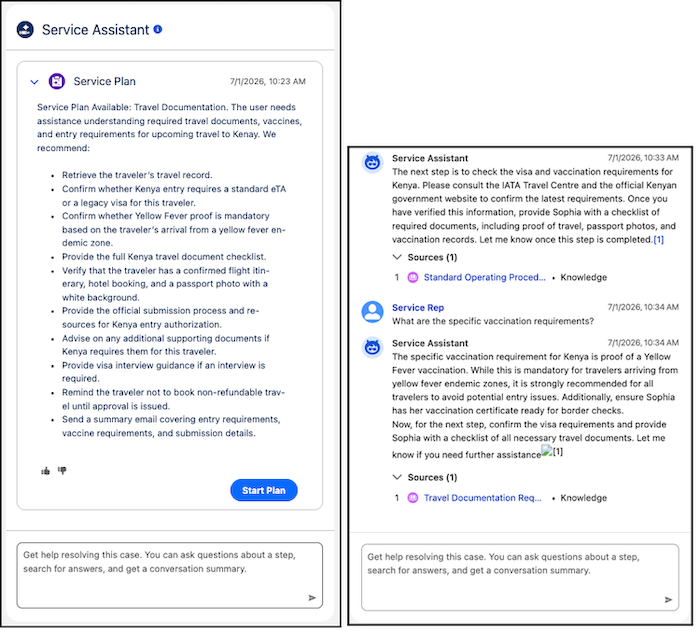
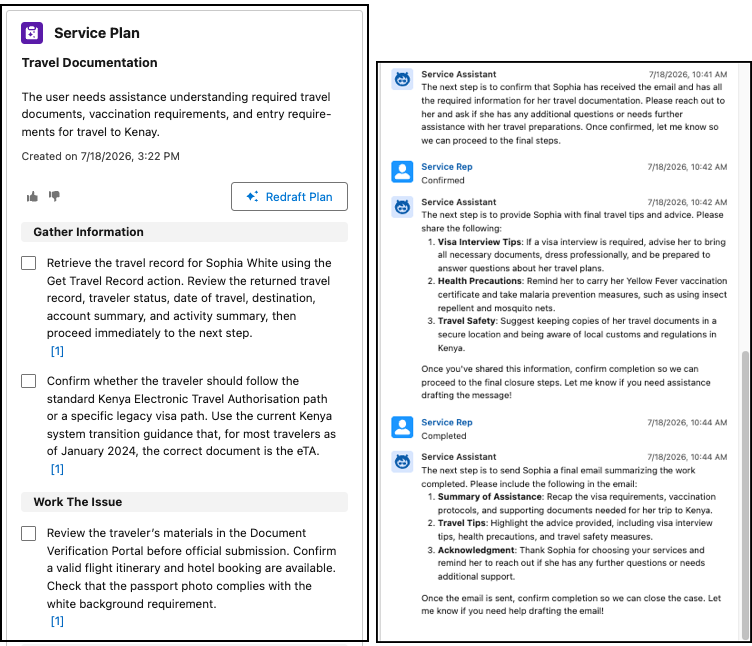
Service Plan Types
There are two service plan types.
- A guidance plan (left image) provides a static checklist of steps that a service rep works through and that doesn't update in real time. With a guidance plan, Service Assistant is reactive. It responds only when a service rep asks for help through the agent chat, and it doesn't proactively propose knowledge articles, actions, or other content in the component feed. The agent chat and component feed aren't turned on by default for guidance plans. To use them, you must turn on the chat from the Service Assistant Setup page.
- A dynamic plan (right image) provides a real-time, conversational workflow where Service Assistant proactively guides service reps through issue resolution, adapts each step as the record changes, and surfaces agent actions.
Messaging and voice suppport only dynamic plans because messaging sessions are fluid, live conversations that change in real time. Case supports both guidance and dynamic plans, and the available features depend on the plan type you choose. See Optional Features for Case. You can choose either plan type based on your business requirements, but you can turn on only one at a time. You can switch between the two.
Service Assistant also offers additional capabilities that extend the agent's functionality beyond the plan, such as Case Catch-Up & Insights and Service Replies. These capabilities are optional, have their own setup, and show as independent cards in the Service Assistant component alongside the service plan. See Service Assistant Capabilities.

Plan Type Comparison
Here's an overview of the differences between guidance and dynamic plans. The details for dynamic plans apply to all supported objects. If you use Service Assistant for Case, review the differences to help you determine which one best fits your business requirements for cases.
For cases, you can turn on only one plan type at a time from the Service Assistant Setup page, but you can switch between the two. When you switch, existing plans of the other type remain visible, but they can't be converted to the new plan type.
| Category | Guidance Plan | Dynamic Plan |
|---|---|---|
| What it is | Static, checklist-style plan that organizes resolution steps into phases. The steps are updated only when a service rep manually redrafts the plan. Service Assistant is reactive and responds only when a rep asks for help through the agent chat. | Real-time, conversational workflow that guides service reps one step at a time and adapts as the record evolves. Service Assistant is proactive and surfaces guidance, knowledge, and actions in the component feed. |
| Availability | Case only. | Case and messaging session. |
| How it's turned on | Opt-in. Turn it on from the Service Assistant Setup page. | Opt-in. Turn it on from the Service Assistant Setup page. |
| Best suited for | Case types with stable, predictable resolution workflows where the steps are consistent for most cases. | Case types where the resolution path changes as information comes in, or where service reps benefit from real-time adaptation. |
| Feature support | Agent Chat, subagents, data libraries, quick actions, and similar cases. | Agent Chat, subagents, and knowledge articles. |
| Adaptability to record updates | Updates to the case are tracked through your Service AI Grounding configuration, but the plan isn't updated automatically. Service reps update the plan by selecting Redraft Plan. |
Steps are updated automatically when new information arrives.
|
| Agent Chat | Not available by default. Turn on the chat feature from the Service Assistant Setup page. | Available by default. |
| Agent action support | Available through Agent Chat only. Service reps ask the agent to launch an action. Service Assistant isn't proactive. To surface task automation directly in plan steps, add quick actions, which show as buttons for service reps to launch. | Surfaced automatically in plan steps when an action is available to complete the current step. Service reps confirm and execute, or the action executes automatically based on your configuration. |
Service Plan Grounding
To create a service plan, Service Assistant reviews the record data and then uses your grounding sources to create steps that are relevant to the record the service rep is working on. Service Assistant grounds a service plan in these sources.
The plan type determines how Service Assistant processes record data, monitors the record for updates, and updates plan steps in real time. For more details, see Service Assistant Record Processing and Service Assistant Grounding Sources.
| Grounding Source | Supported Objects | Details |
|---|---|---|
| Record data (required) |
|
The grounded record data differs by object.
|
| Subagents and instructions (required) |
|
Subagents specify a specific issue type you want Service Assistant to help service reps resolve. Service Assistant use the scope and description of your subagents to identify an issue and assign the subagent to the record. Service Assistant can’t use generic subagents like “Resolve Customer Issue”. Your topics must define a specific issue. Find more details and example in Grounding Service Assistant with Subagents. |
| Knowledge articles through Agentforce Data Libraries (optional) |
|
Ground plans in knowledge articles trough Agentforce Data Libraries. We only officially certify the use of the knowledge data library type for Service Assistant. However, this doesn’t prevent you from setting up and testing other data types (file upload, custom retrievers, and web search), but we don't provide setup guidance or recommendations specific to those data types for Service Assistant. . |
| Agent actions (optional) |
|
Automate tasks in dynamic plan steps. Actions surface directly in the component to service reps and can be executed directly by Service Assistant or require user confirmation. Service Assistant |
| Related record grounding (optional) |
|
Analyzes the transcripts of messaging sessions and voice calls attached to a case. See Agent Chat. |
| Component conversation history and feed. |
|
Service Assistant grounds in all activity that occurs in the component feed: the chat between the agent and service rep, complete steps of a plan, and actions surfaced and executed. See Agent Chat. |
Optional Features for Case Service Plans
For Service Assistant for Case, several optional features extend service plans. Support for each feature depends on your selected plan type. Permissions also vary by feature, and each feature's reference guide and setup steps list the required permissions. Find more details in Extend Service Assistant for Case.
| Optional Features | Description | Supported in |
|---|---|---|
| Case Catch-Up & Insights | A capability of Service Assistant that shows as a card in the component. It summarizes the related account, activity details, and customer sentiment, and it provides a case health score. |
Guidance and dynamic plans. |
| Messaging and Voice Record Grounding | Analyzes transcripts of messaging and voice records attached to a case to summarize what took place and start plan steps from where the conversation left off. |
Guidance and dynamic plans. |
| Quick Action Grounding | Adds buttons to guidance plan steps that let service reps complete a task without leaving the step, such as changing the case status or summarizing a case. Agent actions aren't supported in guidance plans. Service reps can use agent actions only through agent chat. For more details, see Agent Chat. |
Guidance plans only. |
| Similar Cases |
Shows a list of similar cases in a service plan that service reps can review for context while working on a case. The list serves only as a reference guide for service reps to provide additional context while they work on an active case. The listed cases aren't used as grounding sources during the creation of a service plan. |
Guidance plans only. |
| Translation |
Translates service plans into a service rep's preferred language. Translation is supported only in Service Assistant for Case with guidance plans. Dynamic plans for case, messaging, and voice don’t support translation. |
Guidance plans only. |
| Prompt Templates | Adds service plan information to case emails, case summaries, case comments, and the case feed. |
Guidance and dynamic plans. |