To route calls to a contact center queue, map the Salesforce queue to the telephony
provider queue. Although you can define the routing logic using Salesforce queues, the routing
actually takes place in the telephony system using the telephony provider queues. To ensure that
calls are routed correctly, map the queues. Calls assigned to an unmapped queue aren’t routed at
runtime.
Required Editions
This article applies to:
- Salesforce Voice with Amazon Connect
- Salesforce Voice with Partner Telephony
- Salesforce Voice with Partner Telephony from Amazon Connect
| User Permissions
Needed |
| To map telephony provider queues to Salesforce queues: |
Customize Application or Salesforce Voice Contact Center Admin |
If you haven’t already done so, create queues in Salesforce and in your telephony system
before proceeding with this step.
-
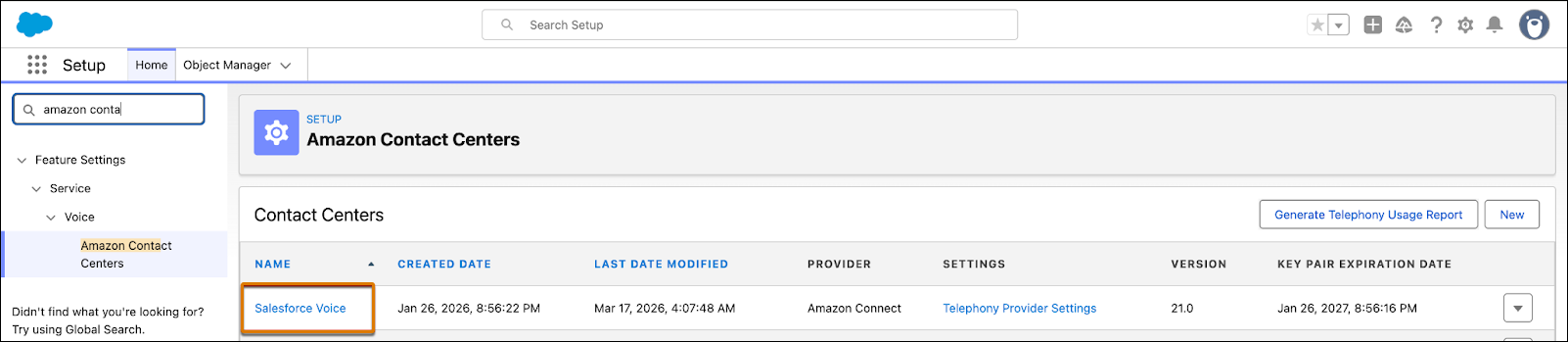
In Setup, enter Contact Centers in the Quick Find box, then select
Amazon Contact Centers or Partner Telephony Contact
Centers, depending on your telephony provider.
-
Click the contact center name for which you want to map queues.
-
Under Queue Mapping, click Add.
-
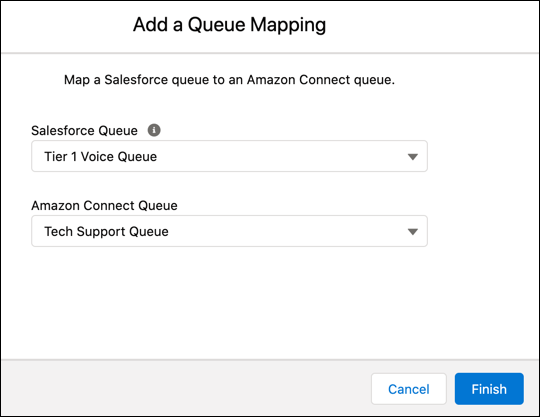
Map the Salesforce queue to the telephony provider’s queue.
The Salesforce Queue dropdown shows queues that support the VoiceCall , or
MessagingSession or both objects, use a routing configuration with the external routing
model, and aren’t already mapped. Each Salesforce queue can be mapped to one external
queue.
-
Click Finish.
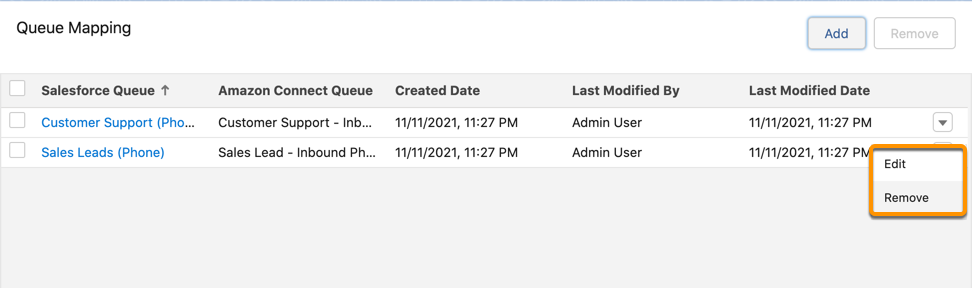
The mapping appears under the Queue Mapping section in the contact center details
page. To edit or delete a mapping, click the dropdown to the right of the queue mapping and
select
Edit or
Delete.