---
schema_version: "1"
id: 4fc14fc741fd1807a7e388cd4a7689d812fe3c46bf50e93f8d0b538284fff7cd
title: Map Your Salesforce Queues to Telephony Provider Queues
collection: admin
version: current
locale: en-us
portal_url: https://docs.salesforce.com/admin/current/en-us/service/264-0-0/service_map_queues.md
canonical_url: https://help.salesforce.com/s/articleView?id=service.service_map_queues.htm&release=264.0.0&type=5
source_site: help.salesforce.com
content_type: documentation
content_hash: 21e63b3437624139ca8d4746976d72ebf06af0751761cc99afadb5e0cd7e3b15
description: To route calls to a contact center queue, map the Salesforce queue to the telephony provider queue. Although you can define the routing logic using Salesforce queues, the routing actually takes place in the telephony system using the telephony provider queues. To ensure that calls are routed correctly, map the queues. Calls assigned to an unmapped queue aren’t routed at runtime.
products:
- Service Cloud
- Digital Engagement
release: "264"
---
# Map Your Salesforce Queues to Telephony Provider Queues
To route calls to a contact center queue, map the Salesforce queue to the telephony provider queue. Although you can define the routing logic using Salesforce queues, the routing actually takes place in the telephony system using the telephony provider queues. To ensure that calls are routed correctly, map the queues. Calls assigned to an unmapped queue aren’t routed at runtime.
### Required Editions
This article applies to:
- Salesforce Voice with Amazon Connect
- Salesforce Voice with Partner Telephony
- Salesforce Voice with Partner Telephony from Amazon Connect
To map telephony provider queues to Salesforce queues:
Customize Application or Salesforce Voice Contact Center Admin
If you haven’t already done so, create queues in Salesforce and in your telephony system before proceeding with this step.
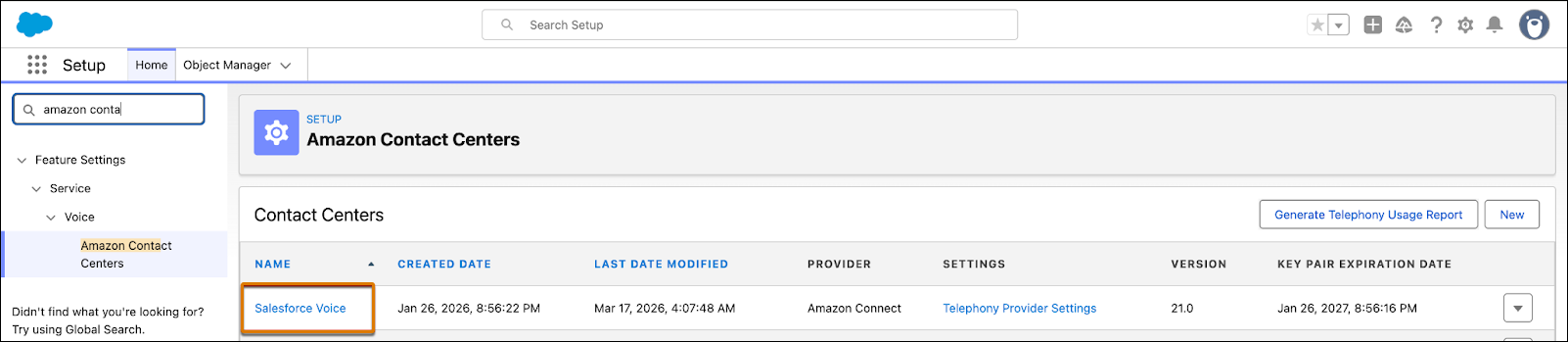
1. In Setup, enter Contact Centers in the Quick Find box, then select **Amazon Contact Centers** or **Partner Telephony Contact Centers**, depending on your telephony provider.
2. Click the contact center name for which you want to map queues.
3. Under Queue Mapping, click **Add**.
4. Map the Salesforce queue to the telephony provider’s queue.
The Salesforce Queue dropdown shows queues that support the VoiceCall , or MessagingSession or both objects, use a routing configuration with the external routing model, and aren’t already mapped. Each Salesforce queue can be mapped to one external queue.
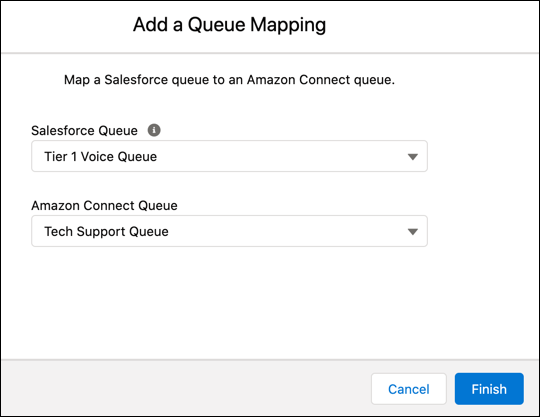
5. Click **Finish**.
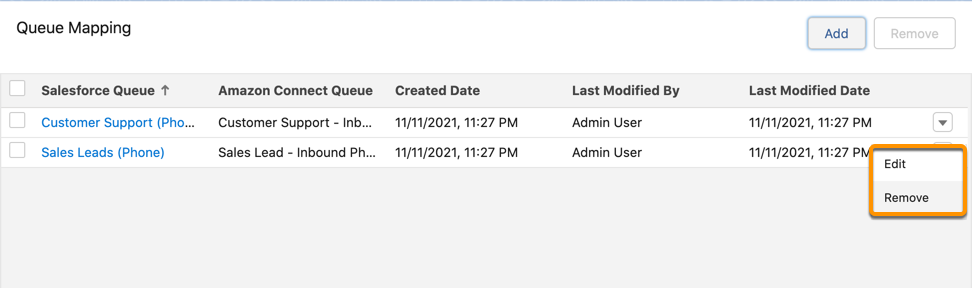
The mapping appears under the Queue Mapping section in the contact center details page. To edit or delete a mapping, click the dropdown to the right of the queue mapping and select **Edit** or **Delete**.
#### See Also
- [Manage External Routing Queues for a Partner Contact Center](https://help.salesforce.com/s/articleView?id=service.byoc_ccaas_partner_routing.htm&type=5&language=en_US)