Self Learning Knowledge gathers and analyzes detailed customer data from chat and case channels to learn about customer behavior and preferences. You can monitor and interpret knowledge gaps from Tableau Next dashboards.
Required Editions
| Available in: Lightning Experience |
| Available in: Enterprise, Unlimited, Developer, and Agentforce
1 Editions with Data Cloud, with Tableau Next, Customer Signals Intelligence, Einstein
Work Summaries, and Knowledge Creation enabled. |
Before you generate a knowledge article draft, set up Einstein Knowledge Creation.
Connect the knowledge fields that you’re using to the out-of-the-box Self Learning Knowledge
prompt template, SLK Knowledge Creation, before attempting to generate a
knowledge article draft.
-
In the Knowledge Intelligence dashboard in Tableau Next, go to the Contact Reason
Insights widget.
-
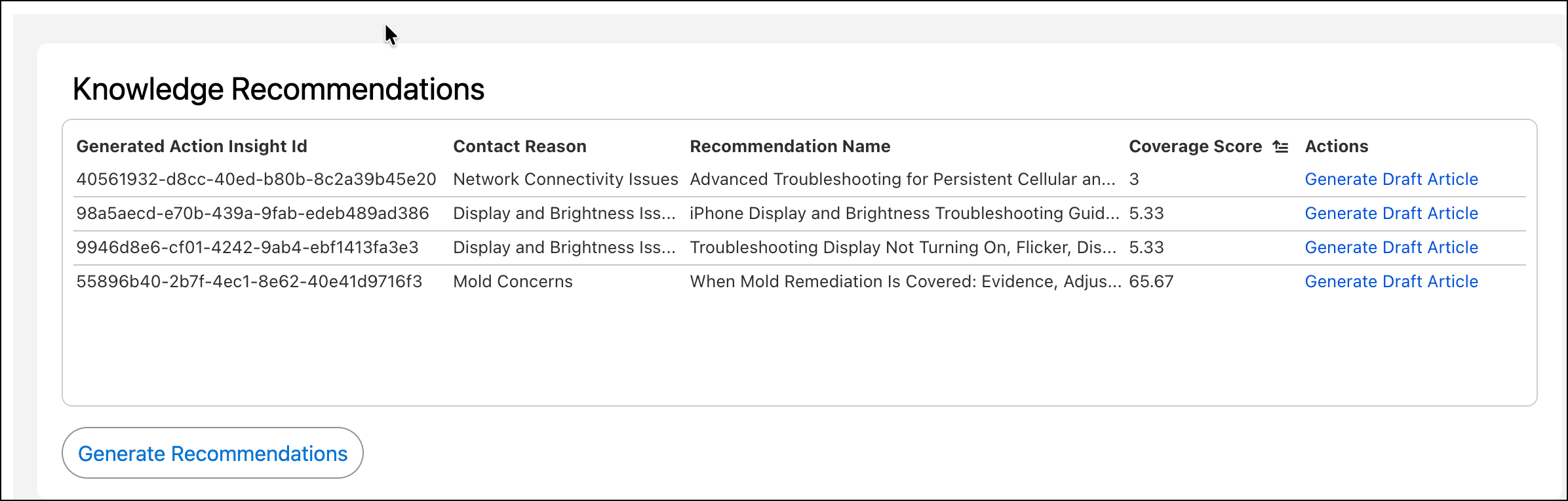
Select a contact reason, then go to the Knowledge Recommendations
widget.
-
Click Generate Recommendations to get more detail about the contact
reason.
-
Click Generate Article Drafts. Generating a knowledge article can
take some time. You’ll get a notification after it’s done.
-
Review the title and content of the generated knowledge article for accuracy and relevance to the case contact reason.
-
Save your work.
