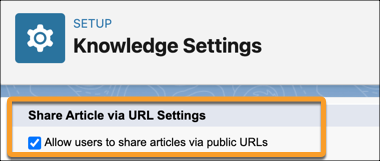
Allow public knowledge article sharing so that Einstein can access your company’s
trusted knowledge content.
Required Editions
-
From Setup, in the Quick Find box, enter Knowledge Settings, and
then select Knowledge Settings.
-
Select Edit, and then scroll down to Share Articles via URLs
Settings and select Allow users to share public articles via URLs.
-
Under Available Sites, move sites you want to use as a knowledge base to Selected Sites.
Information from these sites is used to draft emails, so ensure you can share that information
with customers.
-
Click Save.