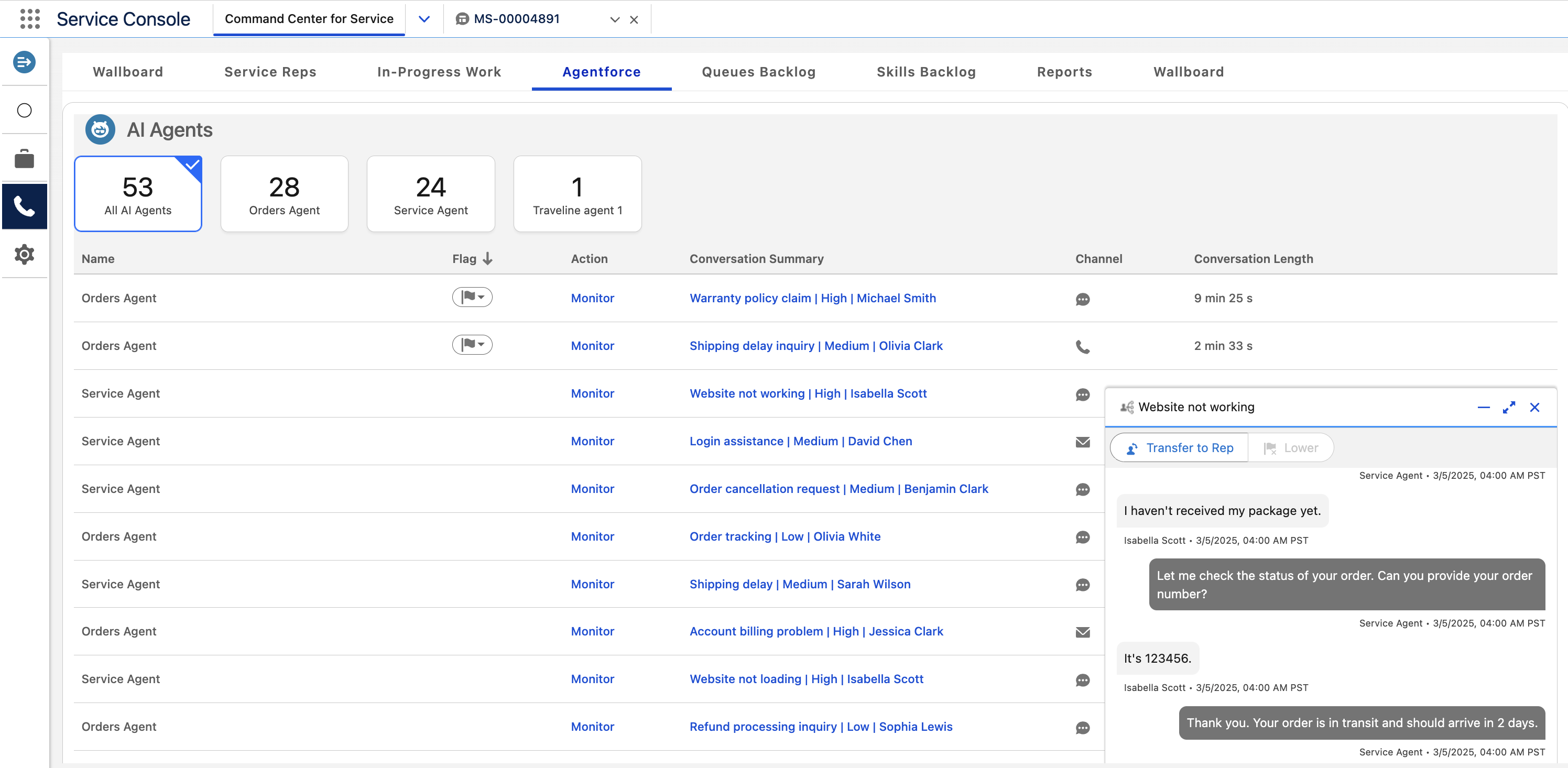
Monitor active enhanced messaging conversations with Agentforce Service Agents. In this
tab, you can view the conversations between them and your customers in real time. You can also
identify which Service agent needs help by looking for raised flags.
Required Editions
The Agentforce tab shows active conversations between Service agents and your
customers. For each conversation, it shows the AI agent name, conversation details, and, if
applicable, the raised flag. Conversations with raised flags appear at the top of the list.
This tab can show conversations for up to 10 Service agents. If there are more agents, the
top 10 agents with the most conversations appear in the tab. The boxes above the table show
the number of active conversations for each Service agent. To filter the list of agent
conversations, select one of the boxes. For example, click All Agentforce
Agents to view conversations for all Service agents.
To view the conversation between a Service agent and customer, click
Monitor. When you view the conversation, click Transfer to
Rep to transfer it to a human service rep. To lower the flag, click
Lower.
- Agentforce Tab Fields
The Agentforce tab contains fields that provide information about the Service agents’ current work. To filter the results for a specific agent, select the box with the agent’s name above the table.