
To give customers better insight into their mobile worker’s location while waiting for their appointments, make sure your geolocation settings are set up.
Required Editions
| Available in: both Salesforce Classic (not available in all orgs) and Lightning Experience |
| The Field Service core features, managed package, and mobile app are available in Enterprise, Unlimited, and Developer Editions. |
| The Field Service Appointment Assistant managed package and permission set license are required. |
| User Permissions Needed | |
|---|---|
| To configure resource tracking: | Customize Application |
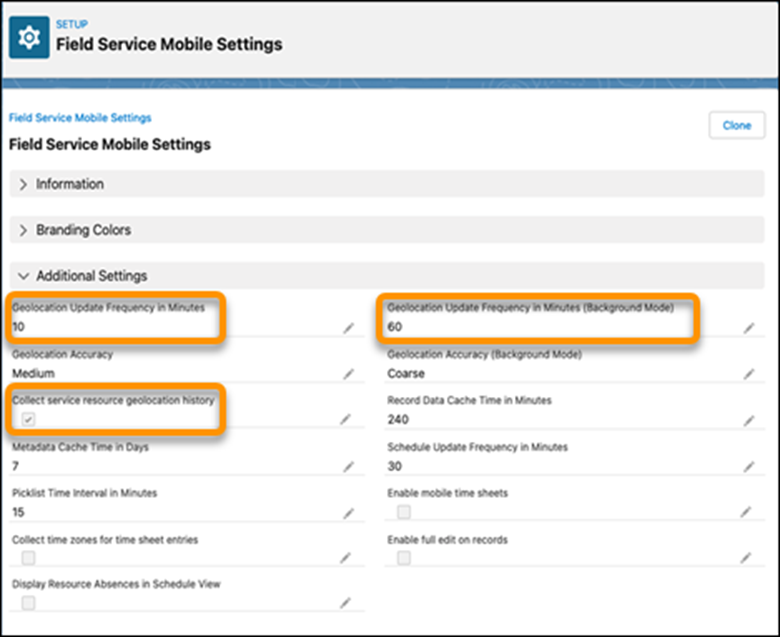
Geolocation settings are used for additional purposes in the Field Service mobile app, so it’s likely they’re set up. To verify setup, follow these steps.
- Open Field Service Mobile Settings.
- Make sure that the Collect service resource geolocation history option is enabled.
-
Make sure that values are entered for the Geolocation Update Frequency in Minutes and
Geolocation Update Frequency in Minutes (Background Mode) settings.
 Note Mobile worker locations are shared during travel to the customer until arrival. While the location is shared, geolocation settings are overridden and get updated every 60 seconds.