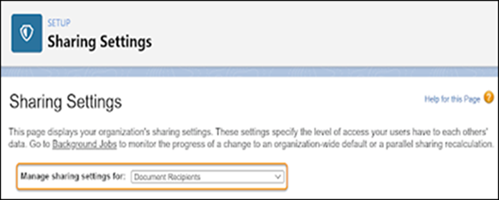
Add a sharing rule to share service report records with the guest users.
Required Editions
| Available in: both Salesforce Classic (not available in all orgs) and Lightning
Experience |
| The Field Service core features, managed package, and mobile app are available in
Enterprise, Unlimited, and Developer Editions.
|
| The Field Service Appointment Assistant managed package and permission set
license are required. |
| User Permissions Needed |
| To create a sharing rule: |
Customize Application |
-
From Setup, in the Quick Find box, enter Security, and then select
Sharing Settings.
-
For manage sharing settings, select Document Recipients.
-
Under Sharing Rules, click New.
-
For Rule Type, select Guest user access, based on criteria.
-
Enter the sharing criteria.
-
For Field, select Status.
-
For Operator, select not equal to.
-
For Value, enter Completed.
-
Select to include records owned by high-volume users.
-
Share the rule with <Your Site Name> Site Guest User.
-
Save the rule.