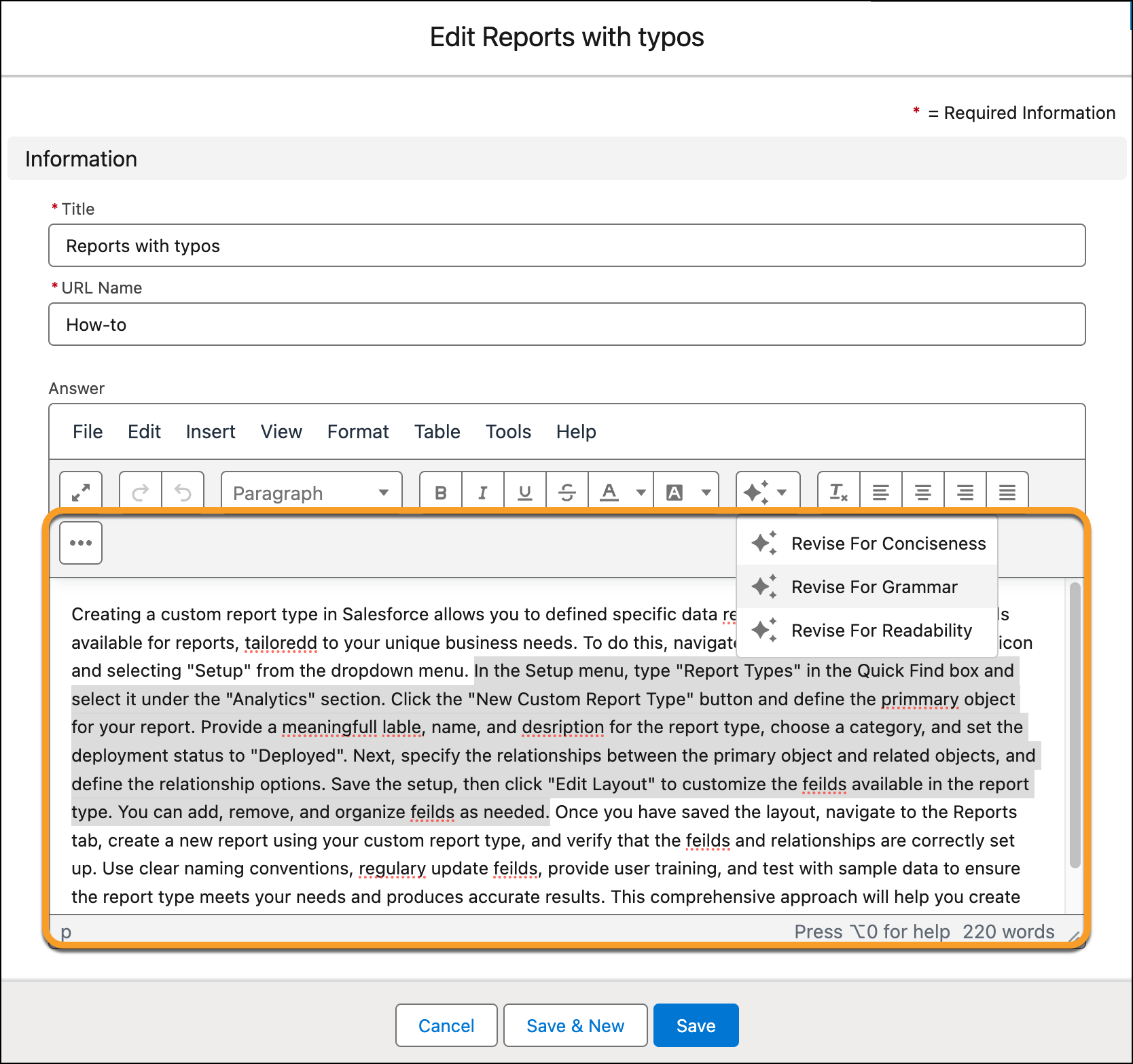
Use Einstein generative AI to revise fields on your Knowledge articles and with predefined styles. Predefined styles can improve the grammar, conciseness or readability of your articles.
Required Editions
| View supported editions. |
| User Permissions Needed | |
|---|---|
| To revise knowledge articles: |
Einstein Knowledge Creation user license AND Knowledge User AND Einstein Knowledge Creation permission set AND Prompt Template License permission set AND Prompt Template User permission set |
| To publish revised articles: | Publish Articles for the article’s type |
- For the Knowledge article that you want to revise, from the quick action menu, select Edit.
- From the toolbar, click Revise with Einstein.
-
From the dropdown menu, choose a focus area for your revision.
- Revise for Conciseness simplifies the language by removing filler words, qualifiers, and repetitive information.
- Revise for Grammar corrects all typos, grammatical mistakes, spelling errors, and misplaced punctuation.
- Revise for Readability uses clear and simple language, converts passive voice to active voice, removes redundancies, reformats appropriate information with bullet points or lists, and rearranges text for better flow.