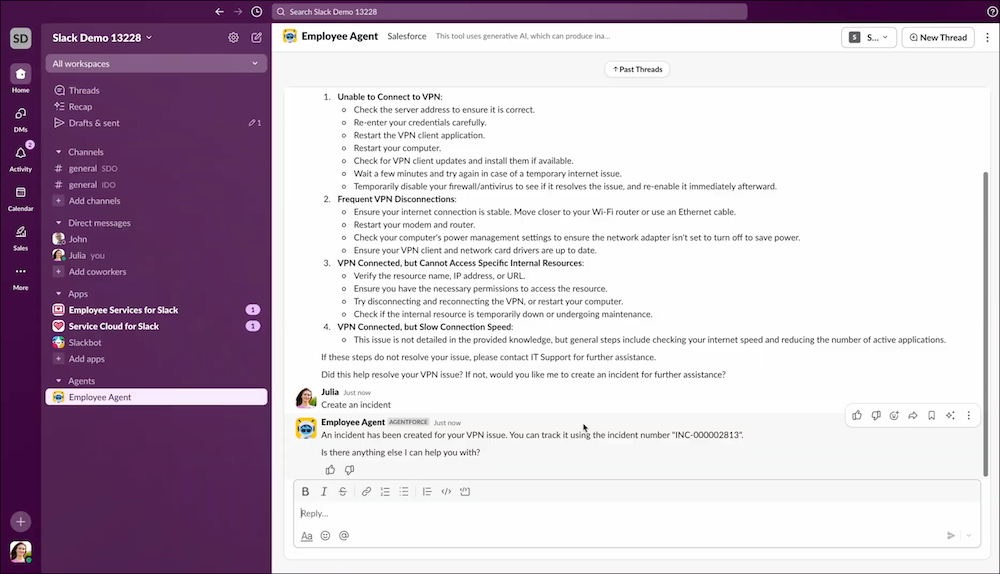
Employees can quickly and easily report issues without leaving their Slack workflow,
reducing friction and ensuring that the IT team gets the information they need from the very
start. Report issues in the Employee Service app by using either Agentforce or a slash
command.
Required Editions
| Available in: Enterprise and Unlimited Editions |
Business Challenge
Traditional issue reporting is often a high-friction process that is disruptive to an
employee’s workflow. It requires them to stop what they’re doing and go to a separate
portal, and when they get there, they’re faced with a blank form without guidance. This can
lead to incomplete tickets, which causes delays and inefficient back-and-forth
communication.
Solution
Reporting issues in Slack lowers the barrier to entry and caters to all users by providing
two distinct methods.
- Conversational AI: This method is ideal for most employees because it feels natural and
requires no training. You can describe your problem, and Agentforce guides you through a
conversation to solve your problem and provide relevant knowledge articles. If you still
can’t solve it using knowledge articles, Agentforce creates a complete actionable ticket
to resolve the issue.
- Slash command: This is for employees who want a faster, more direct approach and if you
prefer a structured, command-line style of interaction. You can use a simple Slash
command: /emp-svcs-create-record Incident, fill in the required
fields, and create a ticket in seconds.