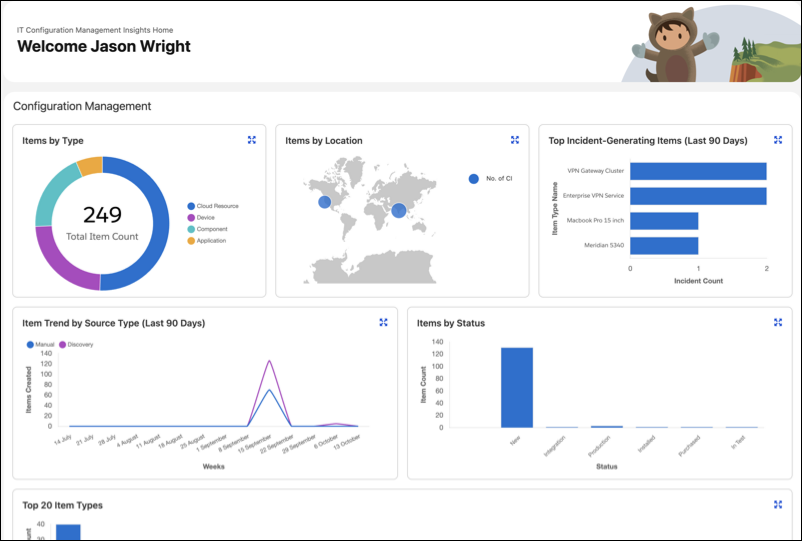
Use the Configuration Management Database (CMDB) dashboard to monitor configuration
trends and asset health across your organization. Gain visibility into configuration accuracy,
recent activity, and data quality to make informed decisions and reduce operational
risks.
Required Editions
| Available in: Lightning Experience |
| Available in: Enterprise, Performance, and Unlimited
Editions with Agentforce IT Service that have CMDB and Service Graph enabled. |
You can view the CMDB dashboard from the Home page of the CMDB and
Service Graph app. Use the following metrices to analyze CMDB data:
- Items by Type shows the distribution of configuration items across categories such as
cloud resources, devices, components, and applications. Verify CMDB completeness.
- Items by Location visualizes asset distribution globally. Identify region-specific
concentration or gaps.
- Top Incident-Generating Items highlights CIs most frequently linked to incidents in the
past 90 days. Detect high-risk assets that may need corrective action.
- Item Trend by Source Type compares data created manually versus discovered automatically.
Monitor discovery effectiveness over time.
- Items by Status provides a breakdown of active, inactive, and transitional items. Track
lifecycle progress.
- Top 20 Item Types lists the most common CI categories in your environment. A quick view of
where assets are concentrated.