
Migrate your existing custom service appointment lists from the Classic Dispatch Console to the Scheduling Console. The migration copies your lists and doesn't affect the originals.
Required Editions
| Available in: Lightning Experience |
| The Field Service core features, managed package, and mobile app are available in Enterprise, Unlimited, and Developer Editions. |
 This is a Field Service managed package feature.
When you migrate service appointment lists, the system copies existing custom shared and individual appointment lists into the Scheduling Console. Standard lists aren't migrated. The original lists in the Classic Dispatch Console remain unchanged.
You can migrate service appointment lists from the Scheduling Console page in Salesforce Go.
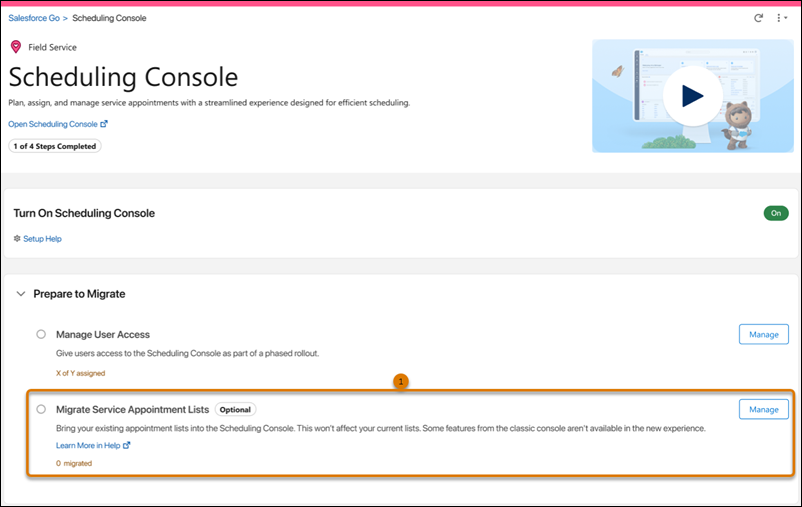
- From the Prepare to Migrate section in Salesforce Go, click Manage next to Migrate Service Appointment Lists (1). The Migrate Service Appointment Lists dialog opens.
In the dialog, select which service appointment lists to migrate to the Scheduling Console.
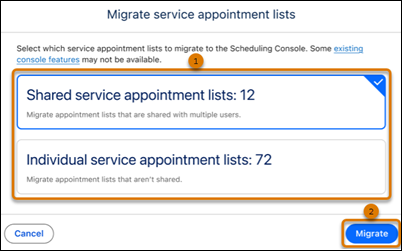
- Select the types of appointment lists to migrate (1).
- Shared service appointment lists: Lists that are visible to multiple users.
- Individual service appointment lists: Lists that aren't shared with other users.
- Click Migrate (2).
When the migration completes, a message in the dialog confirms how many service appointment lists were migrated. The count for each list type updates in the dialog and on the Scheduling Console page in Salesforce Go. A summary is also sent to your email.

Migration Summary Email
After the migration completes, you receive an email that includes the number of shared and individual service appointment lists that were migrated, and a table listing any appointment lists that weren't migrated.
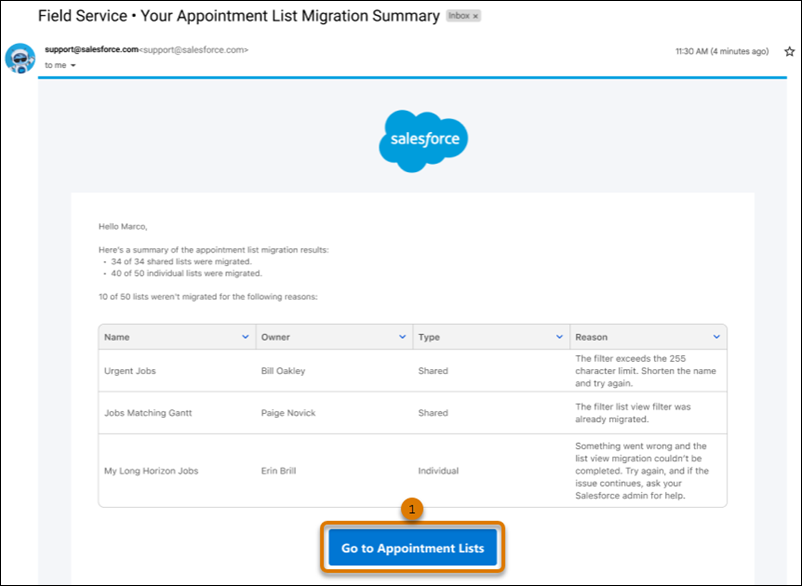
- Click Go to Appointment Lists (1) to view your service appointment lists in the Scheduling Console.
Appointment Lists with Unsupported Features
Some service appointment lists may not migrate or may migrate with limitations if they use features that aren't available in the Scheduling Console.
Appointment Lists that aren't migrated
Standard service appointment lists aren't migrated. In the Classic Dispatch Console, field sets were used to control which fields appear in the service appointment list. In the Scheduling Console, predefined filters located in the filter bar above the service appointment list are used instead. To customize the fields displayed in an appointment list, use Select Fields to Display in the list view settings.
Service appointment lists that use Rule Violations as a filter or field aren’t migrated either. There's currently no equivalent Rule Violations field available for standard Salesforce list view filters in the Scheduling Console. To surface rule-violating appointments, use the Gantt Rule Violations filter from the filter bar above the service appointment list.
Lists that are migrated with limitations
Some service appointment lists are migrated but may behave differently in the Scheduling Console because certain Classic Dispatch Console settings aren't available.
| Classic Dispatch Console Feature | Result After Migration |
|---|---|
| Match to Gantt | The list is migrated. The Match to Gantt setting isn't a configurable option within a Scheduling Console list view definition. To show only appointments currently on the Gantt, use the Match Gantt filter from the filter bar above the service appointment list. |
| Horizon set to a specific date range | The list is migrated. The Gantt's date range is set to unlimited. To filter appointments by a specific date range, use relative date filters in your list view. |