
The Home page is the main landing page after you log in. It provides service representatives a quick overview of the cases assigned to them.
Required Editions
| View supported editions. |
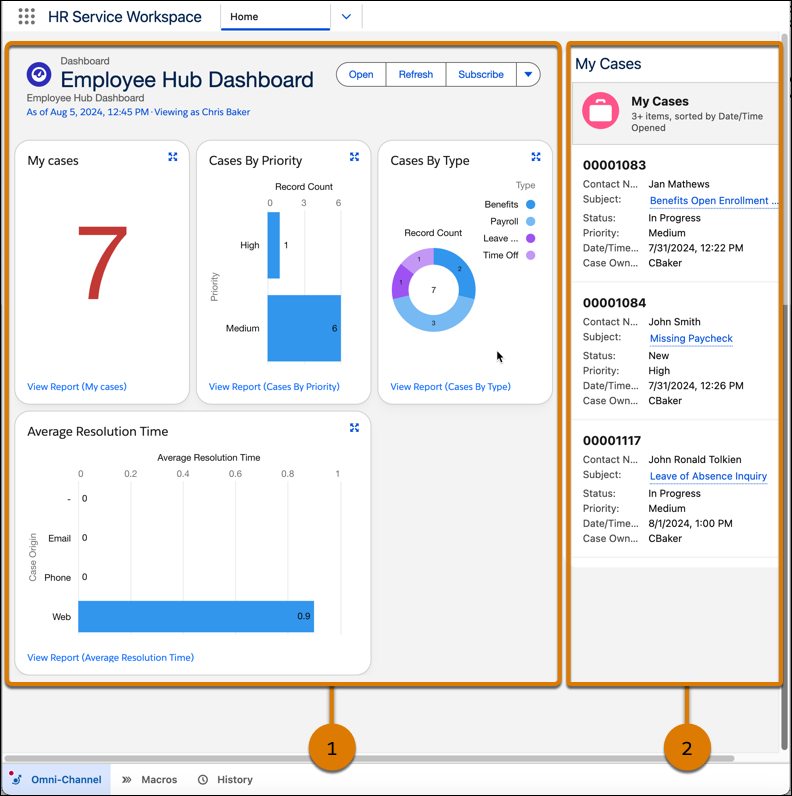
Key features of the Home page are:
- Employee Portal Dashboard (1): The dashboard provides a visual summary of the cases
assigned to a service representative. The dashboard shows case information from these
reports:
- My Cases: The count of the cases assigned to the service representative.
- Cases By Priority: The count of cases by priority.
- Cases By Type: The count of cases by type.
- Average Resolution Time: The average resolution time for cases by case origin.
- My Cases list view (2): The list view shows the recent cases assigned to you. Clicking a case opens the case record page.
