
By default, all Lightning Knowledge users see Einstein Article Recommendations in the Knowledge component. A Lightning Knowledge user is a standard user with the Knowledge User permission and read access to Knowledge articles in Lightning Knowledge. If you prefer, you can limit access to users of your choice.
Required Editions
| View supported editions. |
| User Permissions Needed | |
|---|---|
| To assign permission sets: | Assign Permission Sets |
| To customize Einstein Article Recommendations: | Customize Application |
When you activate your Einstein Article Recommendations model, we ask you to decide who sees article recommendations in the Knowledge component.
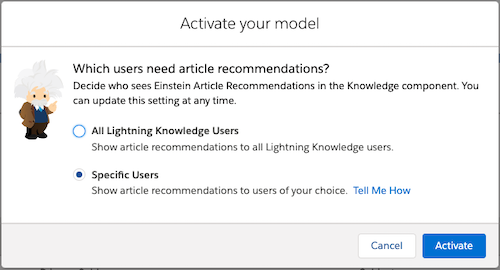
Choose between two access options:
- All Lightning Knowledge Users (default): Show article recommendations to all users of Lightning Knowledge. We recommend selecting this option to avoid user permission assignment and upkeep.
- Specific Users: Show article recommendations to users you
choose—for example, if you’re rolling out the feature slowly. If you select this option,
only users with the View and Act On Einstein Article Recommendations user permission can
see article recommendations. Assign this permission using permission sets or profiles.
- In a permission set:
- From Setup, in the Quick Find box, enter Permission Sets, and select Permission Sets.
- Click the name of the permission set where you want to enable Einstein Article Recommendations.
- Click System Permissions | Edit.
- Select View and Act on Einstein Article Recommendations.
- Click Save.
- In a profile:
- From Setup, in the Quick Find box, enter Profiles, and select Profiles.
- Click Edit next to the name of the profile that needs access to Einstein Article Recommendations.
- Under Administrative Permissions, select View and Act on Einstein Article Recommendations.
- Click Save.
- In a permission set:
You can change your user access preference at any time. From Setup, navigate to the Einstein Article Recommendations page and update the User Access setting.