
To use the recommendations, assign the output from the Article Recommendations action to a collection variable. Then, loop through the collection variable to access the recommended articles and their fields.
Required Editions
| View supported editions. |
| User Permissions Needed | |
|---|---|
| To assign permission sets: | Assign Permission Sets |
| To customize Einstein Article Recommendations: | Customize Application |
The flow action may return articles that aren’t externally visible . To display articles to customers outside your organization, add logic that checks the articles are publicly available.
- On the Elements tab, drag the Assignment element onto the canvas.
-
Assign the JSON output of the Article Recommendations action to an Apex-Defined output
variable.
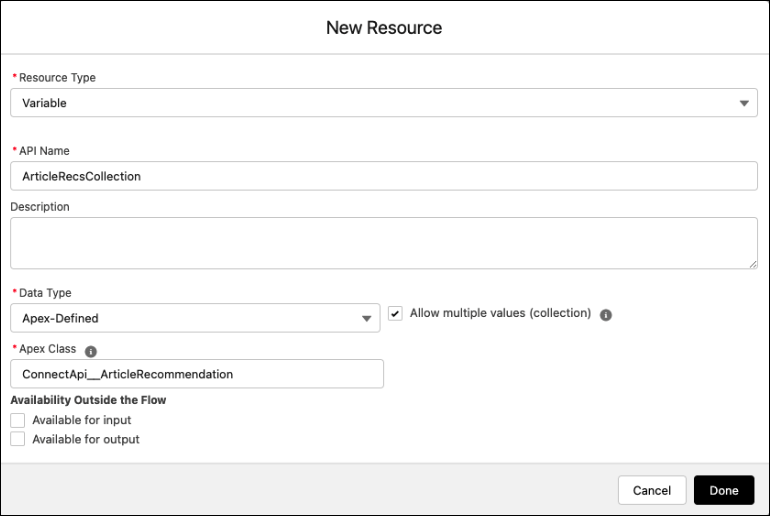
- Add a Loop element to iterate through each item in the variable list.
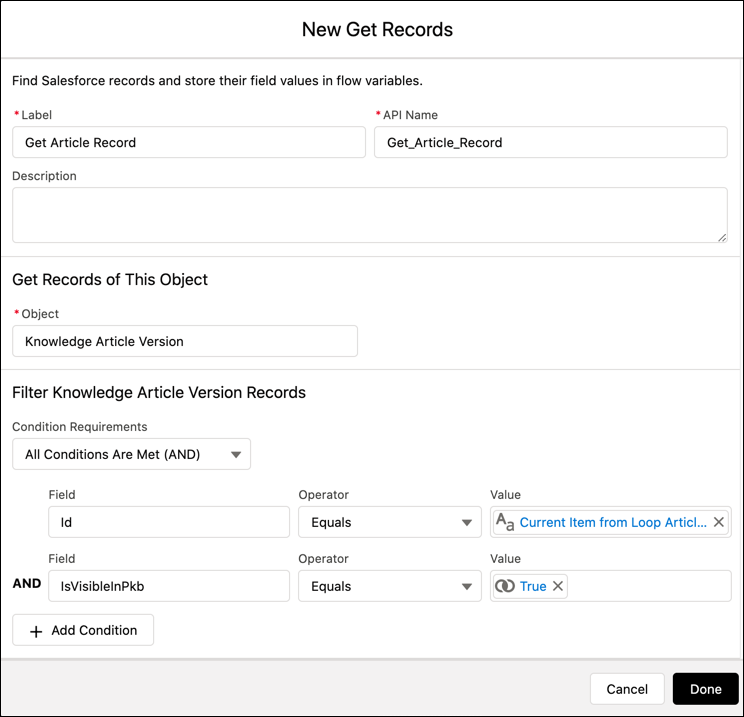
- Inside the loop, drag the Get Records element onto the canvas to filter through the Knowledge Article Version Records.
-
To find the published recommended articles, add a condition
that matches the Knowledge Article Version ID to the ID of the current item from the loop. Add
conditions to check that your articles exist and that they’re publicly available.
This example filters knowledge articles that aren’t included in the public knowledge base IsVisibleInPkb.
- Assign the list of recommended articles to a variable. From there you can use the variable to process the list into a reader-friendly format such as a new screen or email.
- Sample Flow to Send Recommended Articles in an Auto-Response Email
When a customer opens a new case, this flow sends case-relevant knowledge articles in an auto-response email.