---
schema_version: "1"
id: 1aac73240fc5ce987976d778718e33a76a84dc3102c6f984b5145e03f4277487
title: Access the Article Recommendations Action’s Output
collection: admin
version: current
locale: en-us
portal_url: https://docs.salesforce.com/admin/current/en-us/service/264-0-0/einstein_article_recommendations_access_flow_output.md
canonical_url: https://help.salesforce.com/s/articleView?id=service.einstein_article_recommendations_access_flow_output.htm&release=264.0.0&type=5
source_site: help.salesforce.com
content_type: documentation
content_hash: e858df70f03aa530a1568873b16104685625f03235c436d4d5e5e423735b53a2
description: To use the recommendations, assign the output from the Article Recommendations action to a collection variable. Then, loop through the collection variable to access the recommended articles and their fields.
products:
- Service Cloud
- Service Intelligence
release: "264"
---
# Access the Article Recommendations Action’s Output
To use the recommendations, assign the output from the Article Recommendations action to a collection variable. Then, loop through the collection variable to access the recommended articles and their fields.
### Required Editions
The flow action may return articles that aren’t externally visible . To display articles to customers outside your organization, [add logic that checks the articles are publicly available](https://help.salesforce.com/s/articleView?id=service.einstein_article_recommendations_access_flow_output.htm&release=264.0.0&type=5).
1. On the Elements tab, drag the Assignment element onto the canvas.
2. Assign the JSON output of the Article Recommendations action to an Apex-Defined output variable.
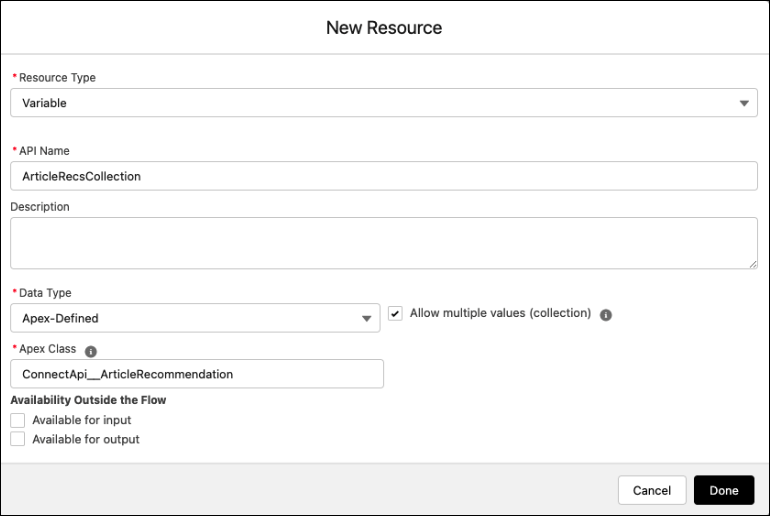
3. Add a Loop element to iterate through each item in the variable list.
4. Inside the loop, drag the Get Records element onto the canvas to filter through the Knowledge Article Version Records.
5. To find the published recommended articles, add a condition that matches the Knowledge Article Version ID to the ID of the current item from the loop. Add conditions to check that your articles exist and that they’re publicly available.
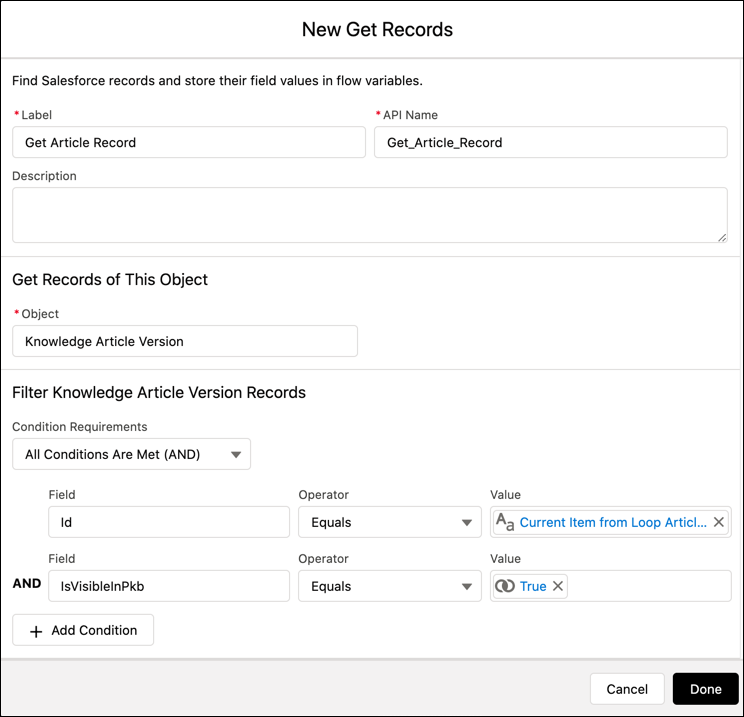
This example filters knowledge articles that aren’t included in the public knowledge base IsVisibleInPkb.
6. Assign the list of recommended articles to a variable. From there you can use the variable to process the list into a reader-friendly format such as a [new screen](https://help.salesforce.com/s/articleView?id=platform.flow_ref_elements_screen.htm&type=5&language=en_US) or [email](https://help.salesforce.com/s/articleView?id=platform.flow_ref_elements_actions_sendemail.htm&type=5&language=en_US).
- **[Sample Flow to Send Recommended Articles in an Auto-Response Email](https://help.salesforce.com/s/articleView?id=service.einstein_article_recommendations_sample_flow.htm&release=264.0.0&type=5)**
When a customer opens a new case, this flow sends case-relevant knowledge articles in an auto-response email.