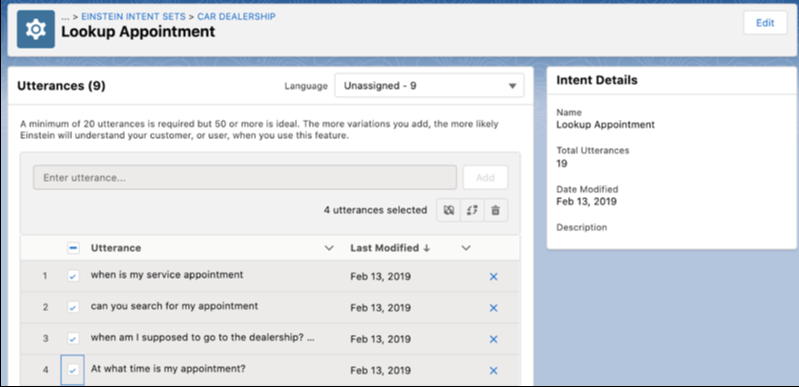
Learn how to use bulk actions in Einstein Intent Sets to move utterances, assign languages, or delete utterances.
Required Editions
| View supported editions. |
| User Permissions Needed | |
|---|---|
| To build and manage Einstein Bots: |
Customize Application OR Modify Metadata OR Manage Bots |
| To manage intent sets and bot training: |
Customize Application OR Modify Metadata OR Manage Bots OR Manage Bots Training Data |

Note Starting in
Summer ’21, utterances are assigned to languages. If utterances exist in your org before
Summer ’21, they’re identified as an unassigned language. All new utterances require a
language, and we recommend that you assign languages to any existing unassigned
utterances.
- From Setup, in the Quick Find box, enter Einstein Intent Sets, and then select Einstein Intent Sets.
- Click the down button next to the intent set, and click Edit. Click the down button next to the intent you want to update, and click Edit.
- Filter the list of utterances by language using the Language dropdown.
- Use the checkboxes to select the utterances to bulk edit and click the global action
buttons.
- Assign Language: Assigns a language to the selected utterances. You can select Clone selected utterances and preserve the original utterances to make a copy of the selected utterances and assign the language to the copies. Bots built to handle multiple dialects can quickly generate utterances using this feature.
- Reassign Utterances: Moves the selected utterances to a new intent or intent set.
- Delete Utterances: Deletes the selected utterances.