
Importing Intent Data is a simple way to add utterances into your bot. You can only upload intent data to dialogs with Intent Enabled, which creates an intent name to relate to the utterances.
Required Editions
| View supported editions. |
| User Permissions Needed | |
|---|---|
| To build and manage Einstein Bots: |
Customize Application OR Modify Metadata OR Manage Bots |
| To manage intent sets and bot training: |
Customize Application OR Modify Metadata OR Manage Bots OR Manage Bots Training Data |

Note You must have
Version 47 or higher of the Data Loader to access the Intent Utterance
object.
- To enable intents for a dialog, click Enable Dialog Intent.
-
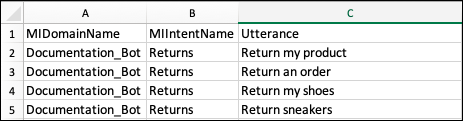
Create a three-column CSV file with the following headers: MlDomainName, MlIntentName, and
Utterance. When uploading directly to a bot, MIDomainName (Capital M, lowercase l) refers to
the bot API name and MIIntentName (Capital M, lowercase l) refers to the dialog API name.
-
Log into Data Loader, and click Insert. After authentication,
click Show all Salesforce objects.
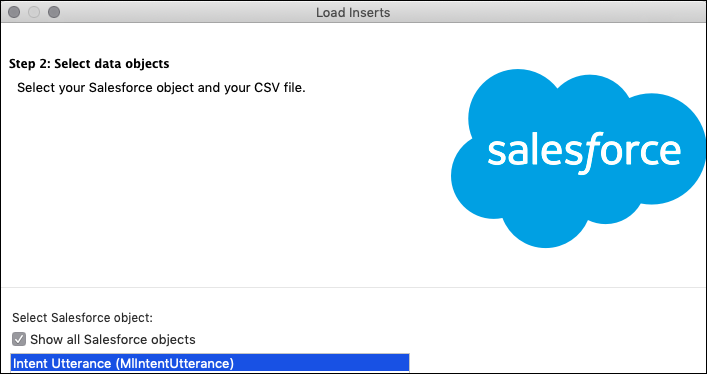
- Select Intent Utterance (MIIntentUtterance) as the Object, and then click Browse to select your CSV file.
-
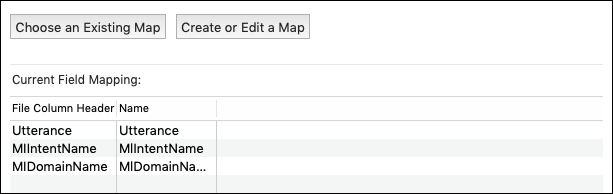
To map your fields to MIDomainName, MIIntentName, and Utterance, click Map
Fields. Click Next.
- To save your success and error files, select a directory. Click Finish.