
Cloning a dialog is a quick way to build your bot. Dialog step cloning helps you set up similar dialog steps with fewer clicks.
Required Editions
| View supported editions. |
| User Permissions Needed | |
|---|---|
| To build and manage Einstein Bots: |
Customize Application OR Modify Metadata OR Manage Bots |
Bots that include similar tasks can benefit from dialog cloning. By building one time and then cloning, you can quickly customize dialogs to fit multiple automation paths.
To clone a dialog:
-
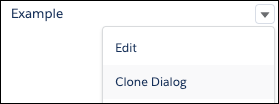
Navigate to the Dialog tab in the Bot Builder and find the dialog to clone. Click the
dropdown
 next to the dialog.
-
Select Clone Dialog in the dropdown.
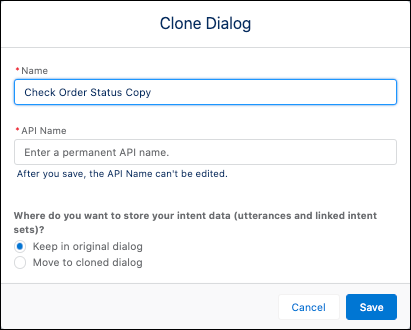
- Enter a new dialog name and API name. The bot requires a unique Dialog Name and API Name for the cloned dialog.
-
If intent is enabled on your dialog, you can choose the destination of the intent data. You
can choose to keep utterances and intent sets in the original dialog or move to the cloned
dialog.
- Save your work.
To clone a dialog step, hover over the  icon in the dialog step and click to clone. The cloned dialog step
appears below the original dialog step.
icon in the dialog step and click to clone. The cloned dialog step
appears below the original dialog step.