
To let your customers know what your bot can do and to provide consistent navigation, add a persistent options menu to the chat window.
Required Editions
| View supported editions. |
| User Permissions Needed | |
|---|---|
| To build and manage Einstein Bots: |
Customize Application OR Modify Metadata OR Manage Bots |

Note Starting August 17, 2026, Einstein Bots is in Maintenance
Mode. Existing Einstein Bots continue to be supported and can be used after August 17, 2026.
However, no new features or enhancements will be added, and we recommend using Agentforce
for new AI agent implementations. See Upgrade Bots to Service Agent
and Learn about
Agentforce.
- The bot options menu is available for standard bots on the Chat channel and enhanced bots on Enhanced Chat.
- The bot options menu can have up to 5 dialogs.
- During the conversation, the bot displays the bot avatar instead of the bot name in the chat window for every message from the bot.
- On the Chat channel, when the bot options menu is opened by a customer, any menus and other hyperlinks in the bot conversation are disabled and can’t be clicked.
-
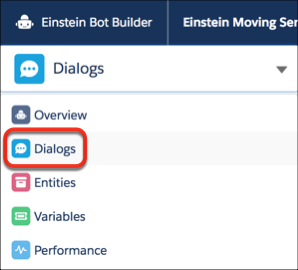
From the Bot Builder menu, click Dialogs.
-
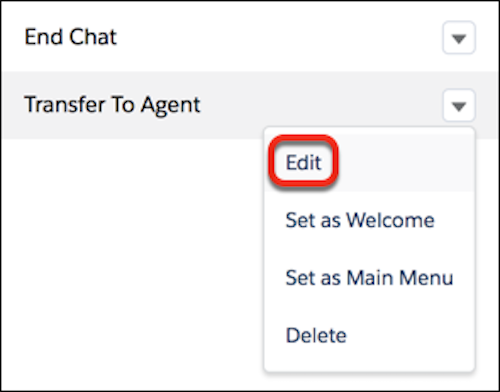
From the dialog you want to add to the bot options menu, click the dropdown menu and
select Edit.
-
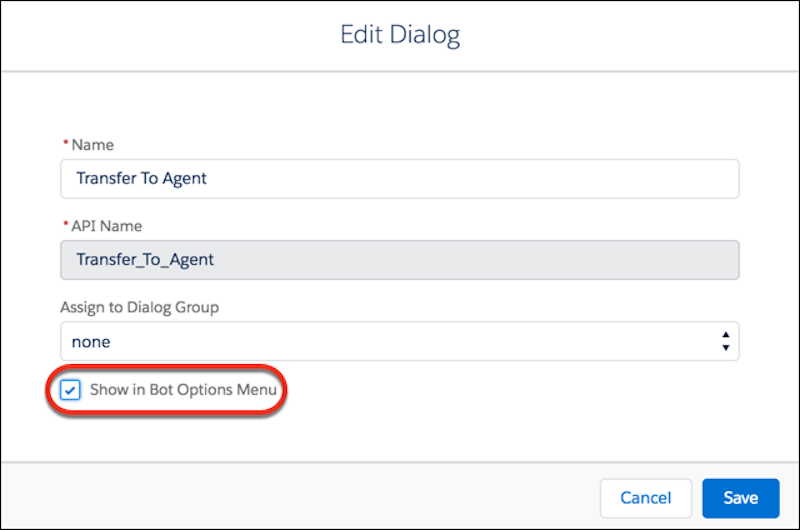
Select Show in Bot Options Menu.
- Save your changes.