---
schema_version: "1"
id: c57965d9ddbd810e21802724f70cb457ed9a453c12978597a800871b9b8d897b
title: Add a Bot Options Menu to the Chat Window
collection: admin
version: current
locale: en-us
portal_url: https://docs.salesforce.com/admin/current/en-us/service/264-0-0/bots_service_bot_options_menu.md
canonical_url: https://help.salesforce.com/s/articleView?id=service.bots_service_bot_options_menu.htm&release=264.0.0&type=5
source_site: help.salesforce.com
content_type: documentation
content_hash: 175cfdb0035fdcaca3958b0a9f6896eafb6081226ff29e1cf55ae36a1db5daa5
description: To let your customers know what your bot can do and to provide consistent navigation, add a persistent options menu to the chat window.
products:
  - Service Cloud
  - Service Intelligence
release: "264"
---
# Add a Bot Options Menu to the Chat Window

To let your customers know what your bot can do and to provide consistent navigation, add a persistent options menu to the chat window.

### Required Editions

<table class="slds-table slds-table_bordered slds-max-medium-table_stacked slds-m-bottom_small edition"><colgroup><col></colgroup><tbody><tr class=""><td class="slds-cell-wrap" style="vertical-align:top;"><a href="https://help.salesforce.com/s/articleView?id=service.einstein_service_intro.htm&amp;language=en_US" target="_blank">View supported editions</a>.</td></tr></tbody></table>

<table class="slds-table slds-table_bordered slds-max-medium-table_stacked slds-m-bottom_small permission">
        <colgroup>
          <col style="width:50%">
          <col style="width:50%">
        </colgroup>
        <thead class="slds-text-title_caps ">
          <tr class="">
            <th scope="colgroup" class="slds-cell-wrap" colspan="2" style="text-align:center;vertical-align:top;" id="d30158e57">User Permissions Needed</th>
          </tr>
        </thead>
        <tbody>
          <tr class="">
            <td data-label="User Permissions Needed" class="slds-cell-wrap" style="vertical-align:top;" headers="d30158e57 ">To build and manage Einstein Bots:</td>

            <td class="slds-cell-wrap" style="vertical-align:top;" headers="d30158e57 ">
              <p>Customize Application</p>
              <p>OR</p>
              <p>Modify Metadata</p>
              <p>OR</p>
              <p style="margin-bottom:0;">Manage Bots</p>
            </td>

          </tr>
        </tbody>
      </table>

![Note](https://sf-zdocs-cdn-prod.zoominsoftware.com/tdta-service-support_intelligence-264-0-0-production-enus/dcd06a7b-b5ab-448b-a767-4e2e90481508/images/icon_note.png)

Note Starting August 17, 2026, Einstein Bots is in Maintenance Mode. Existing Einstein Bots continue to be supported and can be used after August 17, 2026. However, no new features or enhancements will be added, and we recommend using Agentforce for new AI agent implementations. See [Upgrade Bots to Service Agent](https://help.salesforce.com/s/articleView?id=service.bots_service_asa_create.htm&type=5&language=en_US) and [Learn about Agentforce](https://trailhead.salesforce.com/content/learn/trails/design-and-implement-ai-agents-with-agentforce).

- The bot options menu is available for standard bots on the Chat channel and enhanced bots on Enhanced Chat.
- The bot options menu can have up to 5 dialogs.
- During the conversation, the bot displays the bot avatar instead of the bot name in the chat window for every message from the bot.
- On the Chat channel, when the bot options menu is opened by a customer, any menus and other hyperlinks in the bot conversation are disabled and can’t be clicked.

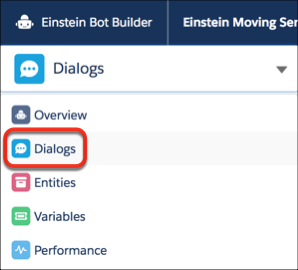
1. From the Bot Builder menu, click **Dialogs**.
    
    ![Dialogs option in the Bot Builder menu](https://sf-zdocs-cdn-prod.zoominsoftware.com/tdta-service-support_intelligence-264-0-0-production-enus/dcd06a7b-b5ab-448b-a767-4e2e90481508/support_intelligence/images/bots/bots_service_builder_menu_dialog.png)
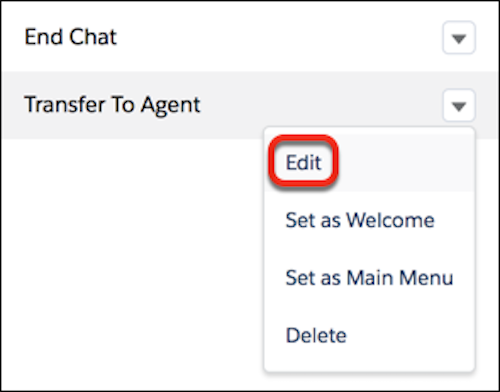
2. From the dialog you want to add to the bot options menu, click the dropdown menu and select **Edit**.
    
    ![Edit a dialog](https://sf-zdocs-cdn-prod.zoominsoftware.com/tdta-service-support_intelligence-264-0-0-production-enus/dcd06a7b-b5ab-448b-a767-4e2e90481508/support_intelligence/images/bots/bots_service_edit_dialog.png)
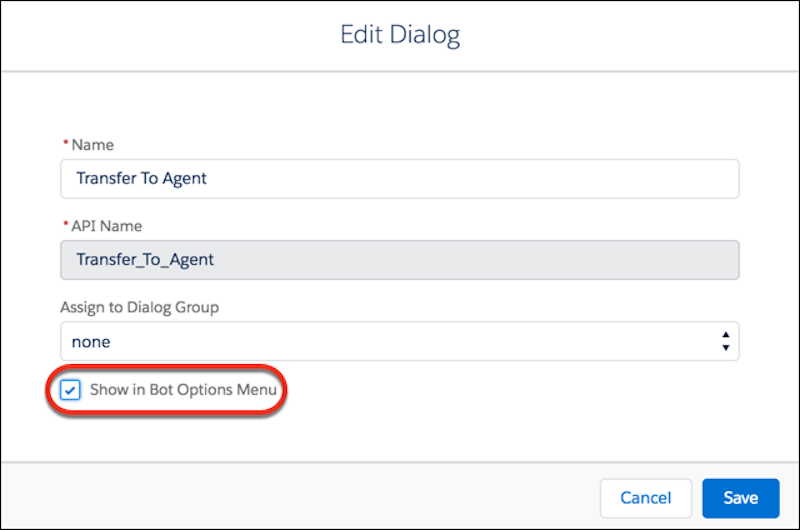
3. Select **Show in Bot Options Menu**.
    
    ![Show dialog in Bot Options Menu](https://sf-zdocs-cdn-prod.zoominsoftware.com/tdta-service-support_intelligence-264-0-0-production-enus/dcd06a7b-b5ab-448b-a767-4e2e90481508/support_intelligence/images/bots/bots_service_edit_dialog2.png)
4. Save your changes.