
Export a dialog group as the basis for a bot block. You can package bot blocks and share them between orgs or on AppExchange.
Required Editions
| View supported editions. |
| User Permissions Needed | |
|---|---|
| To build and manage Einstein Bots: |
Customize Application OR Modify Metadata OR Manage Bots |
A block can be built for either standard or enhanced bot types, but not both in the same block. To learn more about enhanced bots, see Set Up Enhanced Bots. When you create a block from a bot, the block inherits the type from the bot.
Before a dialog group can become a block, you must remove unsupported elements from the bot version. These elements include:
- Transfer actions: A block can’t contain the Transfer to Agent Rule action. The Transfer to Agent system dialog and the Transfer to Agent Next Step are allowed.
- Einstein Intent Sets: A block can’t contain a dialog intent that is linked to an Einstein Intent Set.
- Structured content in Enhanced Bots: Blocks support inbound files, but they don't support outbound files. Blocks don't support messaging components.
- From the Einstein Bots main page, open the bot you want to use to create the block.
-
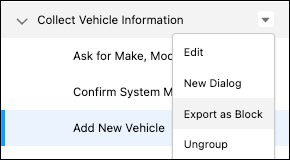
Identity the dialog group you want to use to create the block. Click the dropdown and then
click Export as Block.
-
Give your block a name, and set a primary language and any secondary languages.
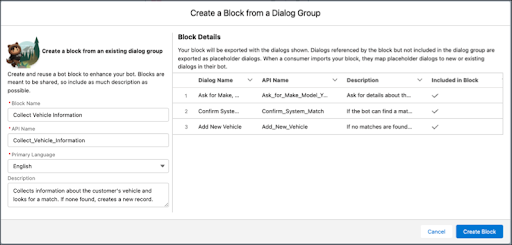
- Optionally, you can add a permission set to your block so any bots created from your template have access to required resources, such as objects and flows.
-
Click Create Block.
The Bot Builder returns to the bot you used to create the block.