
Create an Einstein bot block to share specific functions inside your bot with other bots. You can package bot templates and share them between orgs or on AppExchange.
Required Editions
| View supported editions. |
| User Permissions Needed | |
|---|---|
| To build and manage Einstein Bots: |
Customize Application OR Modify Metadata OR Manage Bots |
A block can be built for either standard or enhanced bot types, but not both in the same block. To learn more about enhanced bots, see Set Up Enhanced Bots.
- From the Einstein Bots main page, go to the Blocks tab.
- To launch the template setup flow, click New Block.
-
Specify your block’s name, primary language and any secondary languages, and the type of
bot you want to create from your template. Optionally, you can add a permission set to your
block so any bots that import your block have access to required resources, such as objects and
flows. Add a description and then click Next.
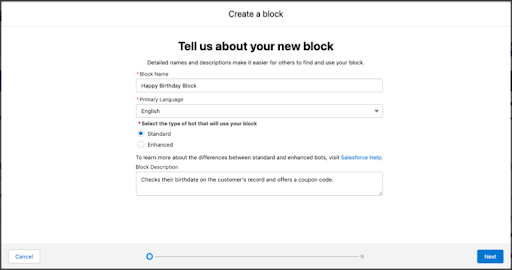
-
Give a name to the first dialog in your block. All blocks must include at least one
dialog.
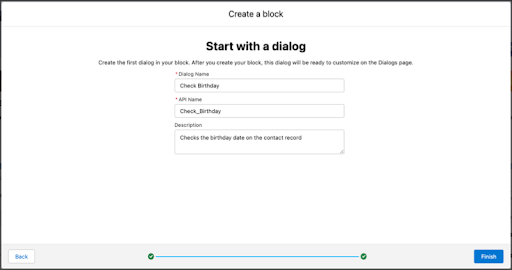
-
Click Finish.
The Einstein Bot Builder opens to the new block and dialog.
- Create a Block from a Dialog Group
Export a dialog group as the basis for a bot block. You can package bot blocks and share them between orgs or on AppExchange. - Package an Einstein Bot Block
Create a managed package to share your bot blocks between orgs or on AppExchange.