---
schema_version: "1"
id: 85051763713a0d69c77111477199c8efdaa5c18c9928c4671c28ee997b5025fe
title: Create an Einstein Bot Block
collection: admin
version: current
locale: en-us
portal_url: https://docs.salesforce.com/admin/current/en-us/service/264-0-0/bots_service_block_create.md
canonical_url: https://help.salesforce.com/s/articleView?id=service.bots_service_block_create.htm&release=264.0.0&type=5
source_site: help.salesforce.com
content_type: documentation
content_hash: ccbd7291e65bdb4b697a4ea1342f3db503811e7c00fbef6ff409c0b648bccd38
description: Create an Einstein bot block to share specific functions inside your bot with other bots. You can package bot templates and share them between orgs or on AppExchange.
products:
- Service Cloud
- Service Intelligence
release: "264"
---
# Create an Einstein Bot Block
Create an Einstein bot block to share specific functions inside your bot with other bots. You can package bot templates and share them between orgs or on AppExchange.
### Required Editions
A block can be built for either standard or enhanced bot types, but not both in the same block. To learn more about enhanced bots, see [Set Up Enhanced Bots](https://help.salesforce.com/s/articleView?id=service.bots_service_enhanced.htm&release=264.0.0&type=5 "Build more secure, more personalized conversational experiences with Enhanced Bots. Connect an enhanced bot to enhanced Messaging channels, including Enhanced Chat and enhanced third-party channels, and to Slack and the Einstein Bots API. Leverage the flexibility of Omni-Channel Flow and powerful business rules to route conversations to and from a bot. Plus, add rich content such as files to your bot conversations—no workarounds required.").
1. From the Einstein Bots main page, go to the Blocks tab.
2. To launch the template setup flow, click **New Block**.
3. Specify your block’s name, primary language and any secondary languages, and the type of bot you want to create from your template. Optionally, you can add a permission set to your block so any bots that import your block have access to required resources, such as objects and flows. Add a description and then click **Next**.
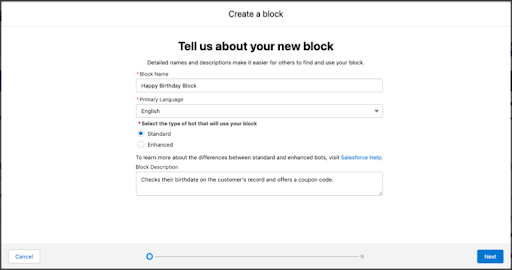
4. Give a name to the first dialog in your block. All blocks must include at least one dialog.
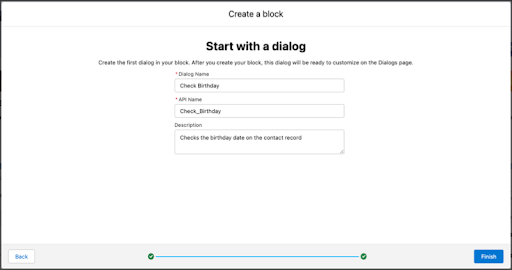
5. Click **Finish**.
The Einstein Bot Builder opens to the new block and dialog.
- **[Create a Block from a Dialog Group](https://help.salesforce.com/s/articleView?id=service.bots_service_block_dialog_group.htm&release=264.0.0&type=5)**
Export a dialog group as the basis for a bot block. You can package bot blocks and share them between orgs or on AppExchange.
- **[Package an Einstein Bot Block](https://help.salesforce.com/s/articleView?id=service.bots_service_block_package.htm&release=264.0.0&type=5)**
Create a managed package to share your bot blocks between orgs or on AppExchange.