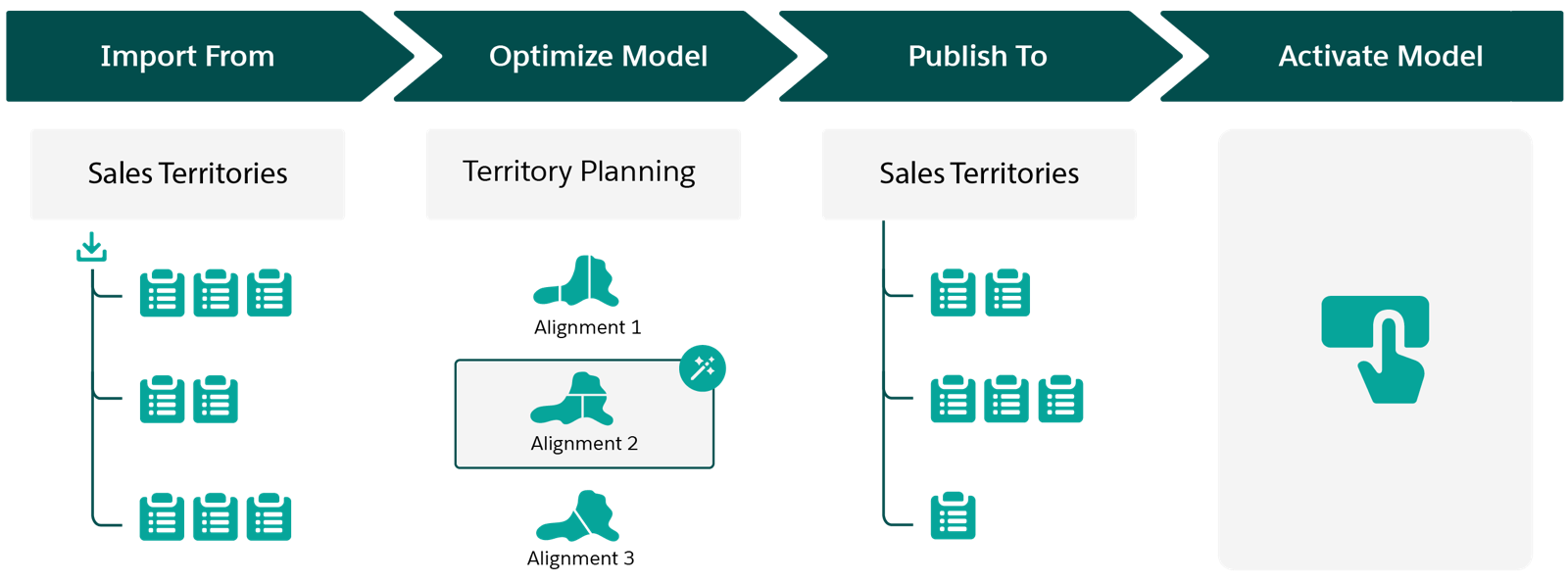
Account for staffing, leadership, and economic changes while you ensure the best
coverage for your company’s accounts, leads, and opportunities. Optimize your model by fine-tuning
assignment rules, redistributing work with consideration for skill levels and tenure, or balancing
territories, all in Territory Planning. Publish your optimized model to Sales Territories, and
then activate it when you’re ready.
Required Editions
| Available in: both Salesforce Classic (not available in all orgs) and Lightning
Experience |
| Available in: Enterprise, Performance, Unlimited, and
Developer Editions
|
Get an idea of what’s involved in planning and managing territories when you pair Territory
Planning, an add-on product, with Sales Territories. When economic changes and compelling events
impact your sales teams, optimize your territory model on a map in Territory Planning. Then
publish your optimized model to Sales Territories where you activate it. Here’s how.
| High-Level Flow |
How It Helps Your Business |
| Import model data from Sales Territories |
Work with your established territory model and refine it based on your changing
needs. |
| Optimize territory models in Territory Planning |
Reflect changes that affect your sales teams in your updated model. |
| Publish the optimized model to Sales Territories |
Run assignment rules, review your updated assignments, and make any adjustments before
you activate your optimized territory model. |
| Activate your territory model |
Apply the changes from your updated territory model. |