The territory hierarchy shows a model’s territory structure and serves as its main
interaction point. Start from the hierarchy to create, edit, and delete territories; run
assignment rules for territories, and navigate to territory detail pages for more information.
From the hierarchy, you can also assign territories to opportunities, run assignment rules at
the model level, and activate or archive the model. The forecasts hierarchy for territory
forecasts is based on your territory hierarchy in the active territory model.
Required Editions
| Available in: Salesforce Classic for some features and Lightning Experience for
all features |
| Available in: Performance and Developer Editions and in
Enterprise and Unlimited Editions with Sales
|
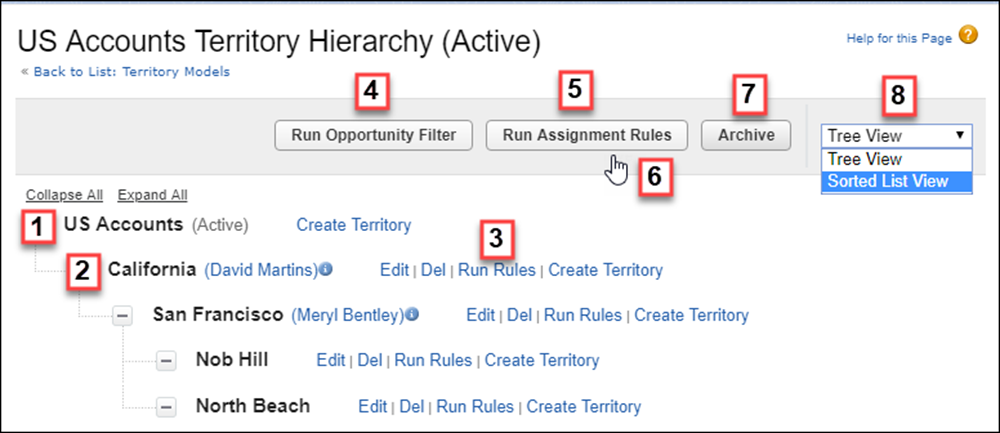
The name and state of the territory model appear at the top node of the hierarchy (1). Parent
and child territories are nested beneath the model name. If a territory has a forecast manager
assigned, the manager’s name appears here (2). Create or edit child territories, or run their
assignment rules (3).
Run the filter that assigns territories to opportunities (4). Run assignment rules for all
territories in the model (5). Hover to learn when rules were last run (6). Set the model’s
state to Active or Archive (7). Toggle to a
sorted list view and back to tree view (8).
