Increase the chances of your sales reps engaging prospects when they work with teammates
on leads. Set up leads so that ones assigned to territories through Sales Territories show any
teammates also assigned to those territories.
Required Editions
| Available in: Salesforce Classic for some features and Lightning Experience for
all features |
| Available in: Performance and Developer Editions and in
Enterprise and Unlimited Editions with Sales
|
| User Permissions Needed |
| To create territories: |
View Setup and Configuration
AND
Manage Territories
|
-
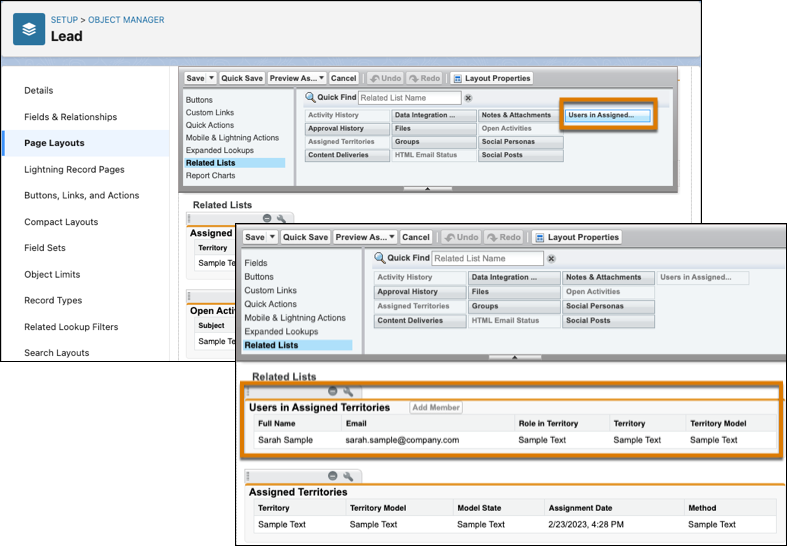
From the object manager settings for leads, open page layouts.
-
Add the related list Users in Assigned Territories to the page
layout.
-
Save your changes.
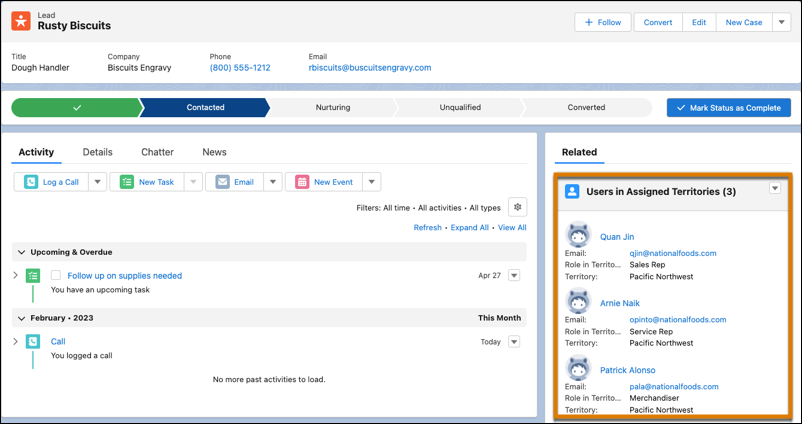
Users assigned to the same territory as the lead appear directly on the lead record.