Determine compensation for reps based on user assignment start and end dates within
territories by using a custom report type that you set up. This historical data gives sales
managers more insight to accurately conduct sales planning, compensate reps fairly, and review
performance analysis.
Required Editions
| Available in: Salesforce Classic for some features and Lightning Experience for
all features |
| Available in: Performance and Developer Editions and in
Enterprise and Unlimited Editions with Sales
|
| User Permissions Needed |
| To assign territory roles to users: |
View Setup and Configuration
AND
Manage Territories
|
-
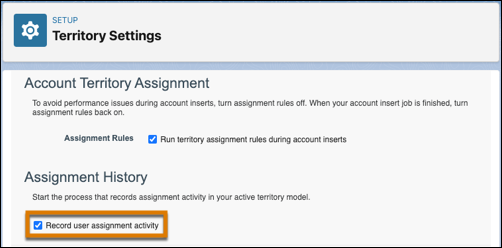
In Territory Settings, select the option that starts the process for recording assignment
activity in your active model.
-
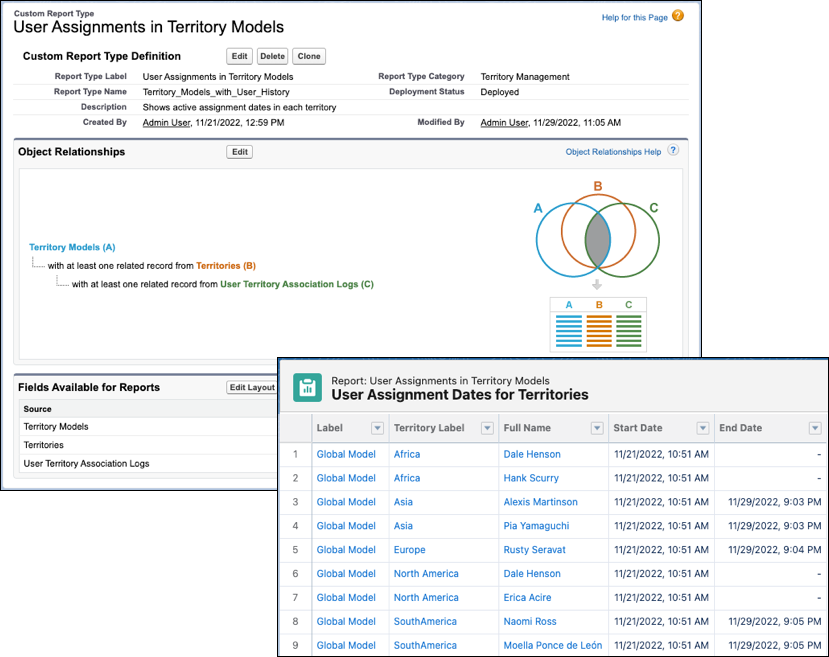
Create a custom report type using the primary object Territory Models. Add object
relationships for Territories and User Territory Association Logs.
Using the custom report type, sales managers can run a report that includes columns such
as Territory Label, Full Name, Start Date, and End Date.