
Territory Planning helps you design optimal territories for sales and service teams. Compare scenarios that help you close gaps in sales and service coverage, distribute the workload fairly, and maintain balanced territories. You choose the best scenario to establish your territory model.
Required Editions
| Available in: both Salesforce Classic (not available in all orgs) and Lightning Experience |
| Available in: Professional, Enterprise, Performance, Unlimited, and Developer Editions with Web Services API enabled |
Territory Planning helps sales and service operations manage and rebalance territories. Specifically, it helps teams:Review what happens when you import Salesforce data into Territory Planning.
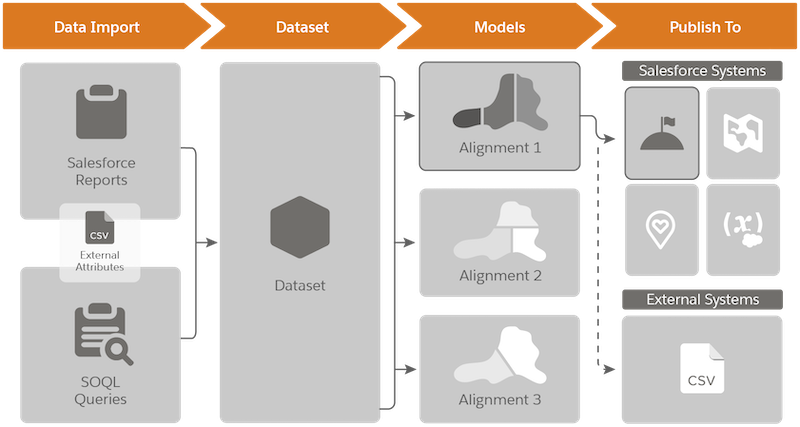
| Stage | What’s Happening Here |
|---|---|
| Data Import |
You import data, such as accounts, leads, opportunities, and cases using Salesforce reports and queries. Supplement the data that you import with attributes from external sources in a CSV file. |
| Dataset | Territory Planning stores the Salesforce data that you import in datasets. Think of them as snapshots of your Salesforce data. Each dataset stores as many as 250,000 records. |
| Models | From your datasets, you create territory models, which we call alignments. Easily compare alignments, and then optimize them. If you want, further supplement your alignments with attributes from external sources in a CSV file. |
| Publish To |
You choose where to publish your alignments.
|
- Align territories with account, user, and critical business data.
- Distribute sales opportunities and service requests in an equitable way.
- Swiftly optimize territories to meet demands of the changing times and their effects on staffing levels.