
Give stakeholders access to datasets and all the alignments within them in Territory Planning. Add teammates to a dataset and select their level of access.
Required Editions
| Available in: both Salesforce Classic (not available in all orgs) and Lightning Experience |
| Available in: Professional, Enterprise, Performance, Unlimited, and Developer Editions with Web Services API enabled |
| User Permissions Needed | |
|---|---|
| To share datasets: |
Sales Planning Ops Analyst permission set AND Query for Datapipelines User for Sales Planning permission set AND SF Maps Territory Planning for Sales Planning permission set |

Note Sharing a dataset also shares all related alignments, but doesn’t share the alignments’ legend and layer configurations. Users who you share the dataset with see the default legend and layer configurations.
-
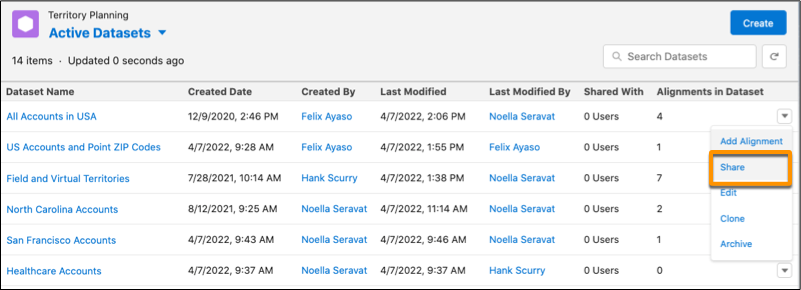
Navigate to the dataset that you want to grant access to. Then select
Share.
-
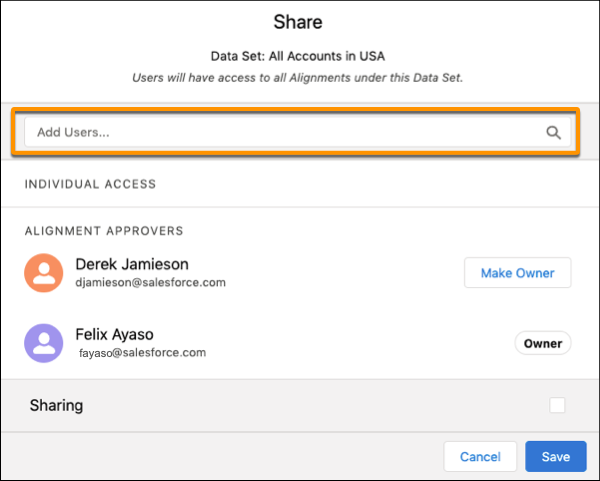
To share the dataset and all of its alignments, add users to the dataset.
-
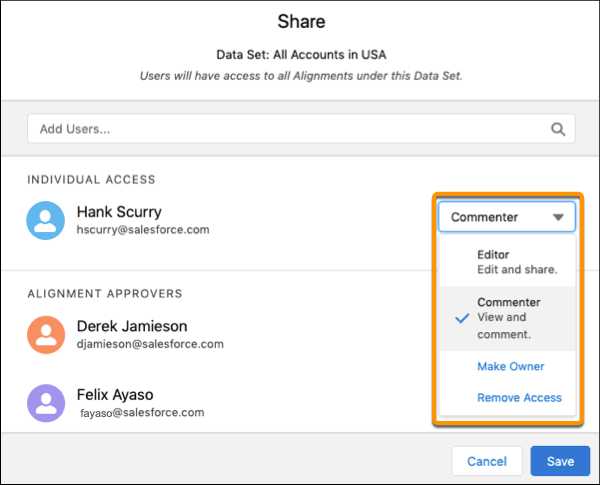
Select the level of access that you want the user to have, then save your changes.
-
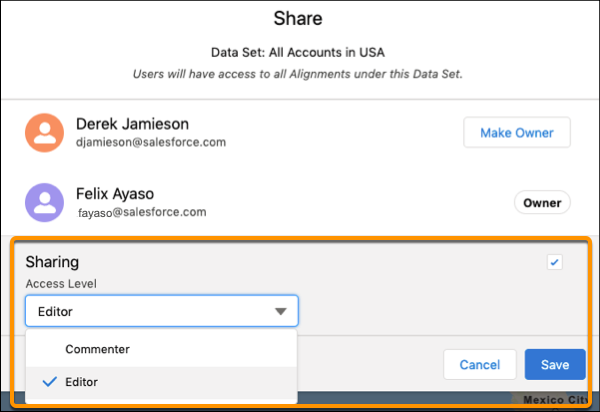
To share a dataset and its alignments with all Territory Planning users, select
Sharing and an access level.
- Save your changes.