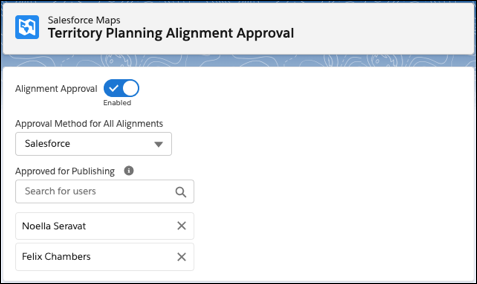
Specify who can approve changes to alignments, and in which sequence they can approve
them. And specify who can publish those approved alignments in Territory Planning.
Required Editions
| Available in: both Salesforce Classic (not available in all orgs) and Lightning Experience |
| Available in: Professional, Enterprise, Performance, Unlimited, and Developer Editions with Web Services API enabled |
| User Permissions Needed |
| To manage Territory Planning options in the Salesforce Maps package: |
Customize Application |
-
From Setup, in the Quick Find box, enter Installed Packages, and
then select Installed Packages.
-
Click Configure next to the Salesforce Maps package.
-
Under Territory Planning, click Alignment Approval, and then turn on
Alignment Approval.
-
Select the method that you want to use for alignment approvals.
For example, to apply the principle of least privilege and enforce a sequence of approvals
based on a hierarchy that you established using a Salesforce approval process, select
Salesforce. Or to give specific users access to all alignments and
grant those users approval rights regardless of order, select
Territory
Planning.
-
For the Territory Planning method, specify who can approve alignments.